Anomaly Shield model management page
This page shows the lifecycle of anomaly detection models:
- The Enforced Model is the model currently used for session evaluation.
- The Prepared Model is the latest trained model.
- A prepared model becomes active after it is enforced and the configuration is activated.
- New models can be created using the Training Task or automatically via retraining.
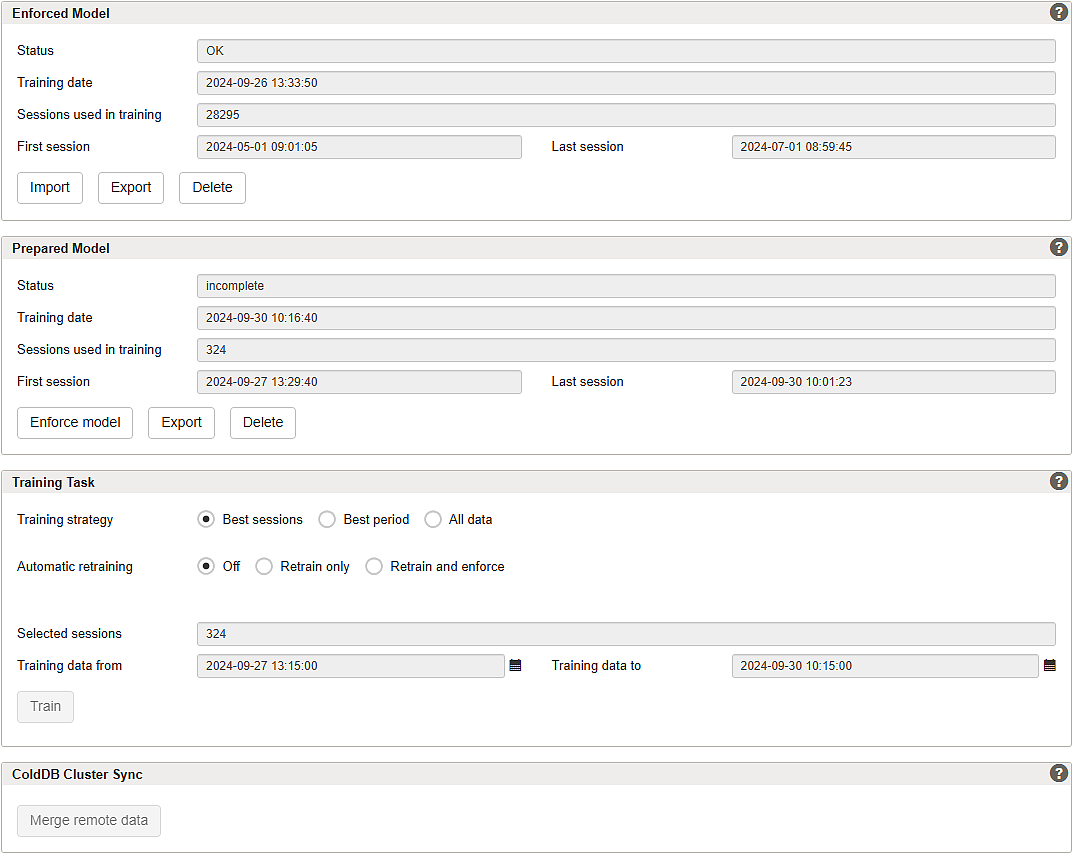
This configuration page is accessible by clicking on the gears button in the Models column of the Anomaly Shield Application page.
Section – Enforced Model
The enforced model is the model currently used by Airlock Anomaly Shield to evaluate sessions. Model changes take effect when the Airlock Gateway configuration is activated.
GUI | Description |
|---|---|
Status |
|
Training date | Date and time when the model was enforced. |
Sessions used in training | The number of sessions used for training. |
First session | Date and time of the oldest session that is used in this training. |
Last session | Date and time of the newest session that is used in this training. |
Buttons | Import Export Delete |
Section – Prepared Model
The prepared model is the latest trained model that can be enforced. It becomes active after it is enforced and the configuration is activated.
GUI | Description |
|---|---|
Status |
|
Training date | Date and time when the model was trained. |
Sessions used in training | The number of sessions used for training. |
First session | Date and time of the oldest session used for training. |
Last session | Date and time of the newest session used for training. |
Buttons | Enforce Model Export Delete |
Section – Training Task
This section defines how models are trained and how model updates are applied.
GUI | Description |
|---|---|
Training strategy | Configuration options:
|
Automatic retraining | Model retraining checks whether the active model uses the most recent data and retrains if necessary. Configuration options:
|
Selected sessions | The number of sessions used for this training. |
Training data from | Date and time of the oldest session that is used in this training. |
Training data to | Date and time of the newest session that is used in this training. |
Button | Train The button is disabled while training is in progress. |
If insufficient data is available, transfer learning is used to generate models. These models improve as more application-specific data becomes available. It is recommended to enable Retrain and enforce to continuously improve model quality.
Section – ColdDB Cluster Sync
Merges ColdDB data from a remote cluster node into the local ColdDB. This can be used to consolidate training data from multiple nodes to improve model training quality.
GUI | Description |
|---|---|
Button | Merge remote data |