Submenu – Anomaly Shield
This page provides access to configure and operate Airlock Anomaly Shield for back-end services.
An Anomaly Shield Application groups one or more mappings and evaluates their traffic jointly as a single behavioral unit.
Anomaly Shield Applications define how traffic is analyzed and are configured using resources from the Triggers & Rules and Traffic Matchers tabs..
You can configure multiple Anomaly Shield Applications to analyze requests.
- Each Mapping must be configured individually to specify which Anomaly Shield Application analyzes its traffic. See Assigning mappings to Anomaly Shield applications.
- A single Anomaly Shield Application can be used by multiple Mappings.
- A Mapping can only be assigned to one Anomaly Shield Application.
Tab – Applications
ON/OFF radio buttons:
- The ON/OFF radio buttons enable or disable the entire Airlock Anomaly Shield service. The service is disabled by default.

The Applications tab provides an overview of all configured Anomaly Shield Applications and their current state across the lifecycle from data collection to active enforcement.
Column | Description |
|---|---|
Anomaly Shield Application | Name of the Anomaly Shield Application. |
Data Collection | Indicates whether sessoin data is currently being collected for model training. |
Detection and Response | Indicates whether anomaly detection and response are active. |
Enforced Model | Shows the model currently used for detection. If no model is available, Detection and Response are disabled. |
Prepared Model | Shows the latest trained model available for enforcement. |
Models | Opens the Anomaly Shield model management page. |
(Delete/add new applications) | Use and to add or delete Anomaly Shield applications. the corresponding button. |


Clicking on an existing entry in the table will open the Anomaly Shield Application detail page.
Tab – Triggers & Rules
Triggers define detection conditions, while Rules define the actions taken when those conditions are met
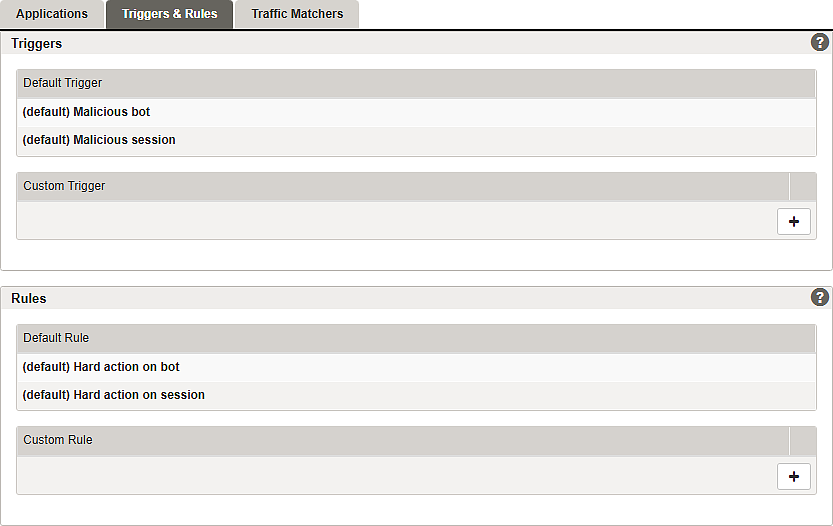
Airlock Anomaly Shield includes predefined triggers and rules for common security scenarios. These predefined entries cannot be modified. Custom triggers and rules can be added and assigned to individual applications.
Traffic assigned to Anomaly Shield Applications is evaluated against the configured Triggers. When a trigger condition is met, the corresponding Rules are applied.
Rules are evaluated in top-down order. The first matching rule is applied.
Rules can be reordered via drag and drop (default rules cannot be moved).
For configuration, open the detail page by selecting an existing entry or adding a new one:
Tab – Traffic Matchers
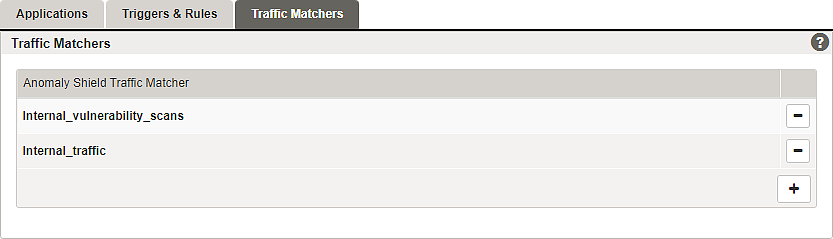
Traffic Matchers define conditions to match incoming traffic based on request properties and IP addresses.
Traffic Matchers are referenced in Anomaly Shield Applications and can be used for:
- Training Data Collection – to exclude selected traffic from being collected as training data
- Anomaly Detection Exclusions – to exclude selected traffic from Anomaly Shield analysis, e.g., internal vulnerability scans or monitoring traffic. Excluding such traffic can also reduce system load.
- Response Rule Exceptions – to prevent Anomaly Shield response actions for selected traffic, e.g., to allow a vulnerability scan without disabling Anomaly Shield for other traffic
For configuration, open the detail page by selecting an existing entry or adding a new one:
Further information and links
Internal links:
- For an introduction including conceptual information, see: Airlock Anomaly Shield
- Configuration is described here: Airlock Anomaly Shield configuration
- For details about anomaly logging, see: Log messages and actions
- For Airlock Anomaly Shield cookies, see: Airlock Anomaly Shield cookies
- Anomaly Shield model management page
- Assigning mappings to Anomaly Shield applications.