Triggers & Rules detail page
Airlock Anomaly Shield is preconfigured with a set of (default) trigger patterns and rules that are known to work well for most security requirements.
Custom triggers and rules may be configured to analyze traffic proactively.
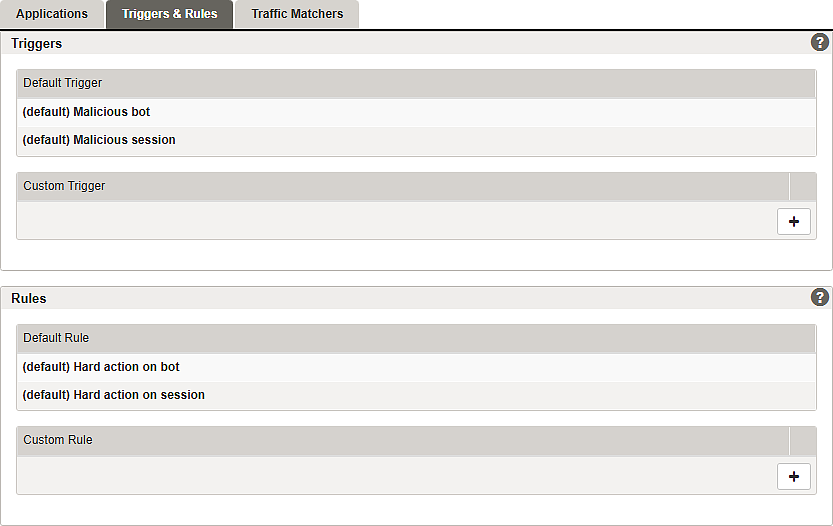
For an example configuration of an additional custom trigger and rule, see article Part 2 – Training and model enforcement.
Section – Triggers

- Name – assign a unique name for the entry.
- Tenant – add tenants to allow tenancy access. See also Multitenancy feature.
Section – Rules
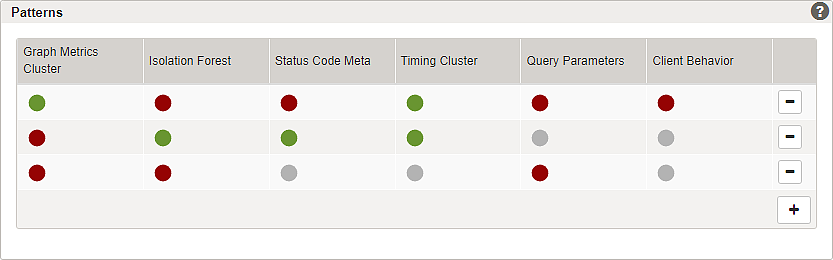
The following screenshot shows a random example of a pattern configuration:
- Use the
+button to add one or more patterns. - The different anomaly indicators form a pattern. Each indicator can be selected to be:
Grey dot – neutral, will match any behavior of this indicator.
Red dot – matches if this indicator shows anomalous behavior.
Green dot – matches if this indicator shows normal behavior.


A best practice configuration example is described in the article trigger, pattern and rule configuration of our Airlock Anomaly Shield configuration guide.
Airlock Anomaly Shield currently implements the following indicators:
Name of the indicator | Short description |
|---|---|
Graph Metrics Cluster | Detects anomalies in navigation behavior based on request path sequences (e.g. repeated paths or unusual transitions). |
Isolation Forest | Detects anomalous sessions based on aggregated session metrics using a general anomaly detection model. |
Status Code Meta | Detects unusual distributions of response status codes (e.g. high error rates). |
Timing Cluster | Detects abnormal timing patterns between requests based on request interval distributions. |
URL Traversal | Detects unusual URL path sequences by analyzing navigation patterns and comparing them against the training data. |
Query Parameters | Detects parameter probing and unusual usage of query and body parameters. Monitors frequency and rarity of parameter names and values. |
Client Behavior | Detects anomalies in client-side interaction patterns (keyboard, mouse, touchscreen), typically used for bot detection. |
Further information and links
Internal links:
- Airlock Anomaly Shield configuration guide for best practice configuration.