Rule detail page
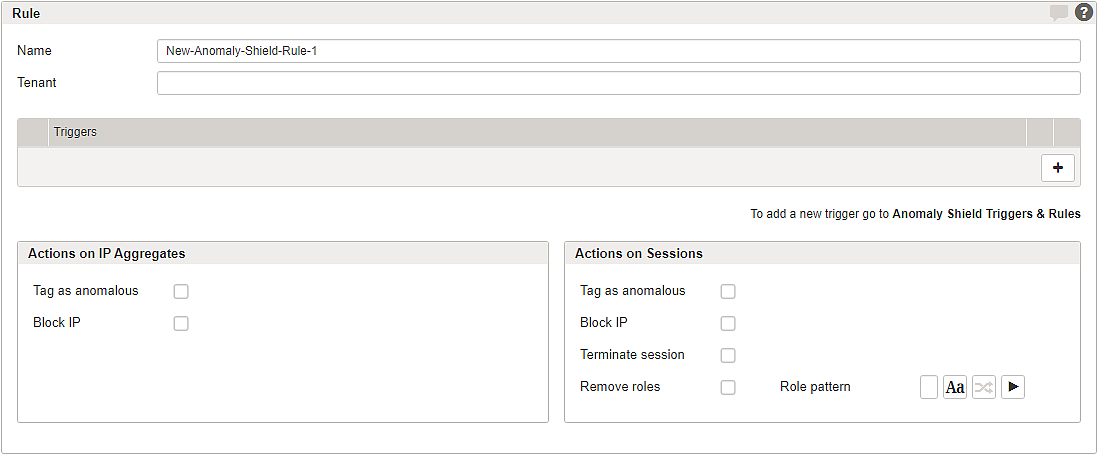
Rules define the actions that are applied when a Trigger is matched. They specify how detected anomalies are handled, either at the session level or across sessions using IP aggregates.
Rules are assigned to Anomaly Shield Applications and configured in the Response Rules section.
A rule is evaluated when one of its assigned triggers matches an anomaly pattern.
The basic rule parameters are:
GUI | Description |
|---|---|
Name | Assign a unique name for the rule. |
Tenant | Add tenants to allow tenancy access. See also Multitenancy feature |
Triggers | Select one or more triggers to be applied by this rule. |
Actions on IP Aggregates
The options in this section allow configuring actions for virtual sessions based on IP aggregates. Airlock Anomaly Shield detects and aggregates sessions from the same client IP address into one virtual session if any option is enabled.
This allows for identifying suspicious IP addresses (e.g., from a bot node or automated tools) and detecting fragmented attacks that may span multiple regular sessions. Suspicious IPs can then be temporarily blocked.
GUI | Description |
|---|---|
Tag as anomalous | Enable/disable anomalous tagging in logged incidents using |
Block IP | Enable/disable IP blocking. The default blocking time is set to |
Note that IP aggregates will not prevent an attacker from continuing attacks blocked by session actions, if the Block IP action is not enabled for IP aggregates.
Actions on Sessions
The options in this section allow configuring how to handle regular sessions when one or more trigger patterns have been triggered.
GUI | Description |
|---|---|
Tag session as anomalous | Enable/disable anomalous tagging in logged incidents using |
Block IP | Enable/disable IP blocking. The default blocking time is set to |
Terminate session | Enable/disable session termination. |
Remove roles including Role pattern | Regex filtering to withdraw roles in case the anomaly rule has been triggered. Removing the role-based access can trigger a re‑authentication, e.g., requesting a 2FA token. Note that role removal is executed only once per session. |
Further information
Internal links:
- For trigger configuration, see Triggers & Rules detail page.
- Tab – Triggers & Rules as the entry point to this detail page.
External link:
- (IAM documentation) Risk-based authentication