Failover cluster setup for on-premises installations
Airlock Gateway can be set up as a failover cluster with two Gateway instances, called nodes, for on-premises installations. In an Airlock Gateway failover cluster, there is always one node active and one node passive.
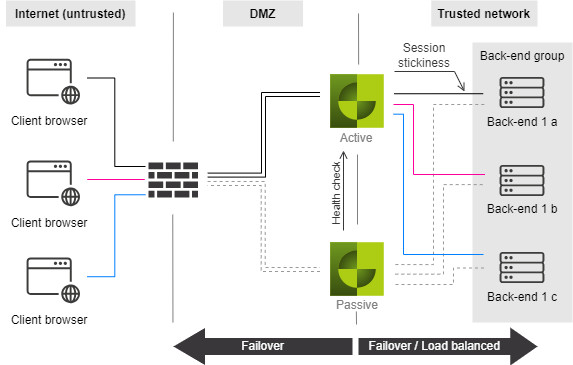
- The active node currently receives the traffic and the passive node is in standby mode. If one node fails, the other automatically takes over.
- The two nodes need a communication channel over an external network interface. This connection is required for monitoring the health status.
- Via the management interface, the database is synchronized and the configuration settings are distributed between both nodes. The management interface and the internal network interface may be the same.
- The external network interfaces require two failover IP addresses. The IP addresses on both nodes are configured crosswise so that the two nodes can communicate with each other.
- For the failover communication protocol, it is strongly recommended to use private IP addresses that are not routed on the Internet (i.e. 10.0.0.0/8, 172.16.0.0/12 or 192.168.0.0/16).
- Clustering uses ports
80and29742on the ext. interface(s) and port22on the mgt. interface.
Notice
Airlock Gateway clusters with multiple external interfaces check the connectivity on all interfaces with configured Private Failover IP/Mirror Failover IP. A failover switch (takeover) is triggered only if there is no connection on all and every interface pairs.