Section – Content Parsing
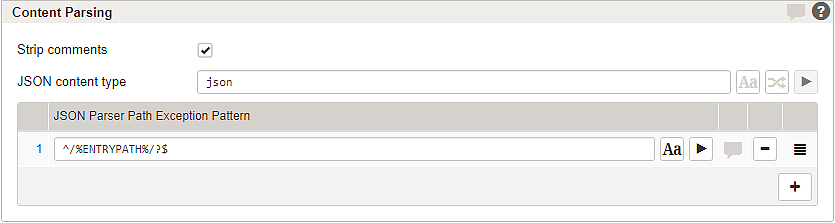
This section allows you to configure how Airlock Gateway parses incoming HTTP request bodies. You can define default patterns for multipart, JSON, and form content types, and specify how the request body should be treated based on the Content-Type header. The default patterns are processed in the following order, which matches the order shown in the GUI:
- form
- multipart
- JSON
In addition, you can create parser rules to selectively disable parsing or assign a specific parser for requests that match certain methods, paths, or content types. To add a new parser rule, click the + button.
GUI | Description | |
|---|---|---|
Strip HTML comments | If enabled, Airlock Gateway removes HTML comments. HTML comments often offer internal information. The option allows Airlock Gateway to remove such comments. Notice This feature is only available if either HTML Rewriting or URL Encryption is enabled. | |
Form content type | An HTTP body is treated and parsed as URL-encoded form data if the HTTP | |
Multipart content type | An HTTP body is treated and parsed as multipart data if the HTTP | |
JSON content type | An HTTP body is treated and parsed as a JSON object if the HTTP | |
Content parser rules | Rules can be defined to selectively enable, disable, or assign a specific parser depending on the request. Matching is based on RegEx for HTTP method, URL path, and HTTP | |
Enabled | By default, a rule is enabled. It can be disabled using the button. | |
HTTP Method Pattern | Input field for a RegEx pattern to match HTTP methods (e.g., GET, POST). Defines which request methods the rule applies to. | |
Path Pattern | Input field for a RegEx pattern to match the external URL path. Only requests whose path matches this pattern are affected by the rule. | |
Content Type Pattern | Input field for a RegEx pattern to match the HTTP Content-Type header. Used to apply the rule selectively to certain body formats. | |
Parser | Drop-down menu to choose the parser that should be used for matching requests. The possible options are Form, JSON, Multipart, or OFF (to disable parsing). | |
[Comment] | Comments can be added using the button. | |
[Delete] | A rule can be deleted using the button. | |
[Reorder] | A rule can be reordered using the button. | |


All regex input fields for content parsing provide the following controls:
- Case sensitivity toggle (): switches between case-sensitive and case-insensitive matching.
- Invert toggle (): applies the rule when the regex pattern does not match.
- Test button (▶): validates the regex pattern against sample values to confirm correct behavior.

