Column - Mapping
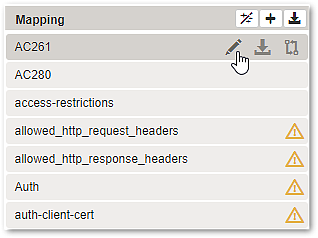
Button | Position | Description | |
|---|---|---|---|
Bulk Operations | 1st button in the column header. | ||
Add new Mapping | 2nd button in the column header. | ||
Export (all mappings) | 3rd button in the column header. | Click on the button to save all mappings in a single zip-file. | |
Export (single mapping) | This icon will appear when hovering above a mapping entry. | Click on the icon to save the selected mapping in a zip-file. | |
Edit | This icon will appear when hovering above a mapping entry. | See Mapping detail page. | |
Compare to selected Mapping | This icon will appear when hovering over a mapping entry that is not yet connected. | Click the icon to open the Configuration Diff page. | |


