Section – Access Tokens
Authorization based on JWT is supported. If any extraction method is enabled, a matching token sent with the request will be verified and decoded. Restrictions for token claims can be enforced and roles required for accessing the mapping can be extracted from the token.
If more than one token matches the extraction pattern, only the first token will be considered.
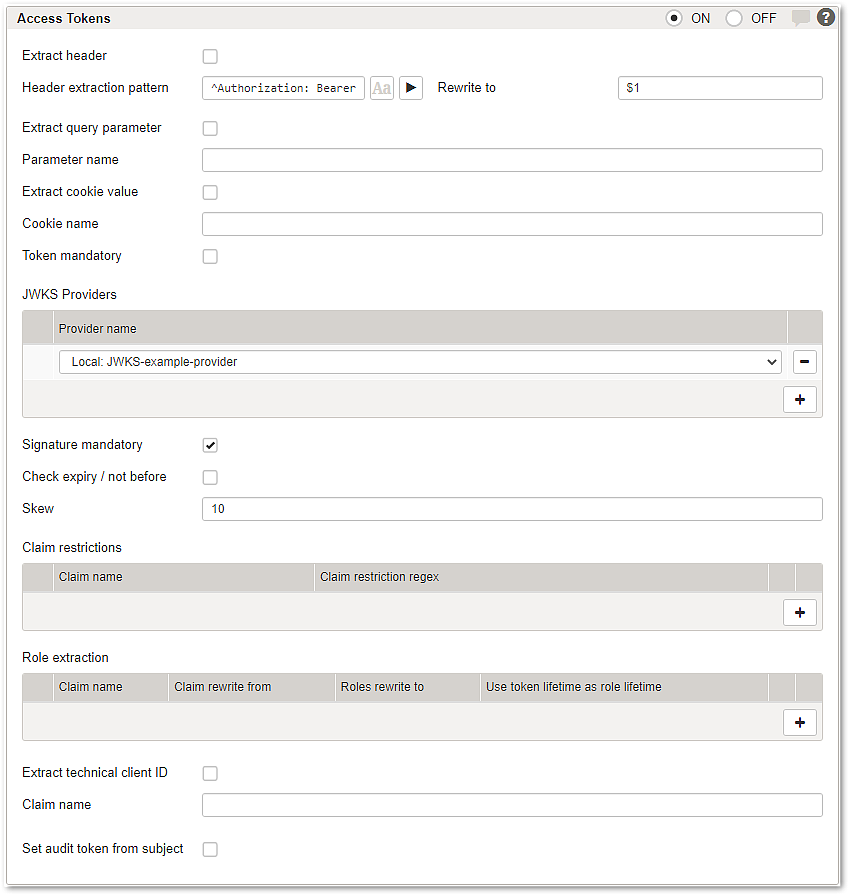
GUI | Description | |
|---|---|---|
Extract header | Allows extracting an access token from a specific header. You can specify an extraction pattern and a rewrite rule. If the JWT is missing (if mandatory), invalid, violates any claim restrictions or does not provide the needed credentials to access the mapping, the request will be rejected. For a configured Redirect authentication flow, this will result in a redirect to the denied access URL, all other authentication flows result in a response with HTTP status code 403. | |
Extract query parameter | If enabled, Airlock Gateway will extract the token from the specific query parameter. | |
Extract cookie value | If enabled, Airlock Gateway will extract the token from the named cookie. | |
Token mandatory | If disabled, requests without a token are accepted. However, if a token is present, it is extracted and validated and the configured restrictions and role extractions are applied. | |
JWKS Providers | Choose the JWKS providers for the mapping. Note that JWKS providers must be preconfigured. For more information, see: Submenu – JWKS Providers | |
Signature mandatory | If enabled (default), only JWS and nested JWEs with signatures are allowed. If disabled, also less secure JWEs without signatures are allowed. | |
Check expiry / not before | If checked the JWT standard claims expiry (exp) and not before (nbf) will be checked and must be valid. | |
Skew | The allowed skew when checking expiry / not before in seconds. This can be used if verification fails because of time synchronization issues with the token issuer and the Airlock Gateway. | |
Claim restrictions | All specified claims are checked and must match the claim's value of the decoded token. If a claim field is an array, at least one entry must match the specified regex pattern. | |
Claim name | Name of the claim you want to restrict. | |
Claim restriction regex | The regular expression that must match the value of the specified claim name. | |
Role extractions | Allows you to extract claim values and set roles from it. | |
Claim name | Name of the claim you want to extract a role from. | |
Claim rewrite from | The regular expression to match the role extraction. | |
Roles rewrite to | The rewrite expression of the role. The use of Control API syntax is not supported. | |
Use token lifetime as role lifetime | If enabled the expiry claim (exp) of the JWT will be used as the role lifetime. | |
Simple role extraction: Example Claim name: role Claim rewrite from: ^(.*)$ Roles rewrite to: static-role This will set the role Step-up role extraction: Example Claim name: acr Claim rewrite from: ^LOA3$ Roles rewrite to: strong-authentication This will set the role | ||
Extract technical client ID | If enabled, a technical client ID is extracted from the JWT. Functional limitation This setting will be ignored if Enable API Keys Service is enabled. See Section – API Policy. | |
Claim name | Name of the claim to extract as technical client ID. | |
Set audit token from subject | If enabled, the value of the sub claim is extracted from the JWT and used as the audit token for the current Airlock Gateway session. | |