Log Masking
Log masking helps prevent sensitive information from being exposed in access logs by masking selected log fields values before they are written. Rules defined in a LogMaskingPolicy custom resource specify which log fields to mask, helping prevent credentials, tokens, passwords, and API keys from being logged. Masked values are rendered as ****.
Log masking can be configured in three ways:
- Built-in field categories (recommended)
- Mask entire groups of request data (e.g., credentials or tokens).
- Header rules
- Mask values of custom request headers matching your rules.
- Parameter rules
- Mask values of custom request parameters matching your rules.
Prerequisites
- A Gateway Deployment.
- An
HTTPRouteroutes traffic to your application.
Configuration
This section shows how to configure Airlock Microgateway to mask sensitive data in the logs.
Create a LogMaskingPolicy resource
Create a LogMaskingPolicy that targets your HTTPRoute, enables a built-in masking category, and define custom header and parameter masking rules.
About LogMaskingPolicy configurations:
Under
spec.request, you define the log masking rules:- Built-in masking rules are configured in
fieldCategories. - Custom masking rules for request headers are configured in
headers. - Custom masking rules for request parameters are configured in
parameters.
Built-in masking categories
The built-in masking categories are applied as follows:
- If no
LogMaskingPolicyis defined, the built-in masking categories are applied by default. - If
spec.request.fieldCategoriesis not specified in aLogMaskingPolicy, the built-in masking categories are also applied by default. - To disable the built-in masking categories, configure
fieldCategories: [].
Custom masking rules
Additional headers and parameters can be masked with
spec.request.headersandspec.request.parameters.- Use
name.matcherto match a header or parameter name. - Use
value.matcherto match a header or parameter value. - If both a name matcher and a value matcher are configured, the value is masked only if both conditions are fulfilled.
Header name matching is case-insensitive. Parameter name matching, by default, is case-sensitive.
Validation
Validate masking in the access logs
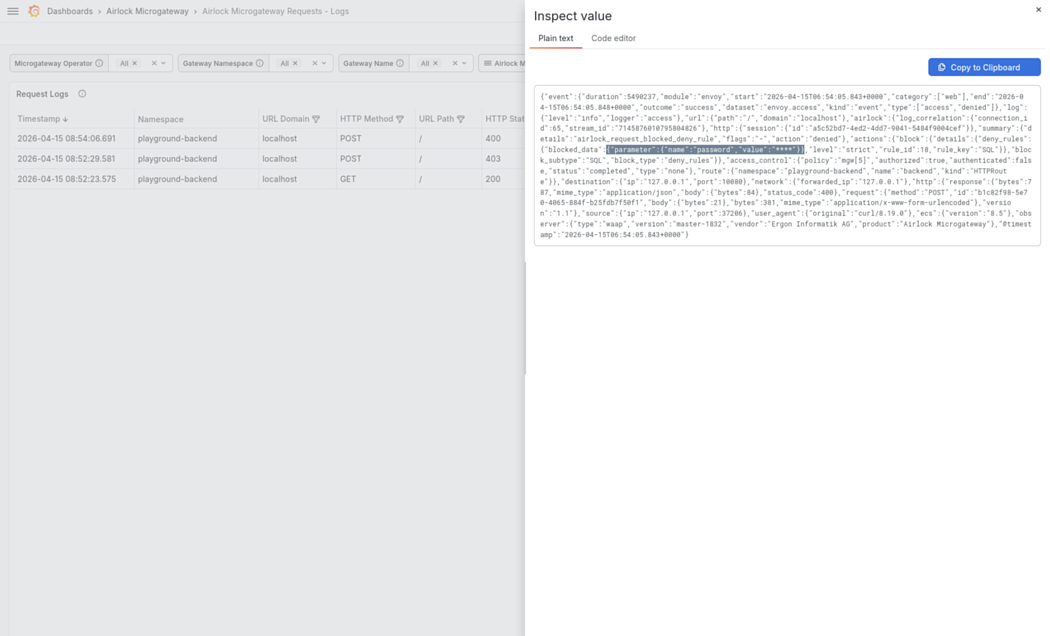
Trigger a request that would normally include sensitive values (e.g., Authorization: Bearer ... or a password parameter) and inspect the access log entry. If masking is active, the sensitive values are shown as ****.
Validate in Grafana
Use the built-in Grafana dashboard Airlock Microgateway Threats Block - Logs and inspect the Details field for blocked requests. Confirm that the configured header or parameter values are masked.
Limitations
- Masking is applied only to parameter and header values blocked by the following filters:
- Deny rules, including both built-in and custom rules
- Limits
- Encoder, for example due to invalid encoding
- Values for query parameters are not masked.
- Sensitive data can still be visible in the application log at log level debug and trace.