ICAP Integration
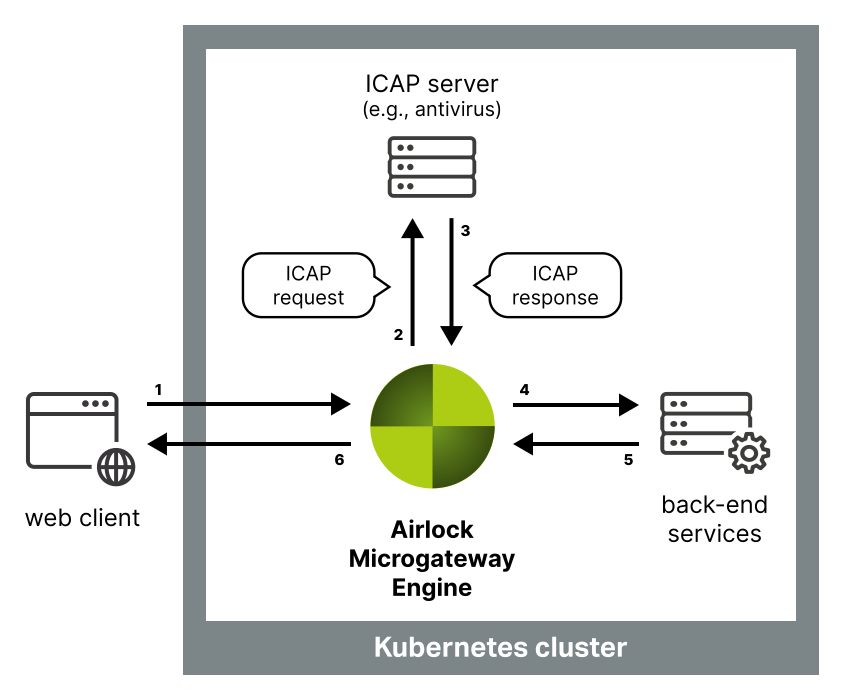
Airlock Microgateway supports the Internet Content Adaptation Protocol (ICAP) as defined in RFC 3507. ICAP allows Microgateway to forward incoming HTTP requests to an external ICAP service before the requests reach the backend application. The main purpose of this integration is to scan incoming requests for malware, e.g., when clients upload files or submit content that should be inspected before it is processed by back-end services. This helps prevent malicious payloads from reaching protected applications. Beyond malware scanning, ICAP can also be used to inspect, analyze, and adapt requests by applying custom logic such as content checks, metadata enrichment, header or body rewrites, or request blocking.
Overview
Prerequisites
- A Gateway Deployment.
- An
HTTPRouteroutes traffic to your application. - An ICAP service (e.g., malware scanner) is deployed and reachable.
Configuration
This section explains how to configure Airlock Microgateway to use ICAP to filter requests through an external ICAP service.
Configure the ICAPProvider resource
Create an ICAPProvider that defines the ICAP server endpoint and connection settings.
Configure the ICAPPolicy resource
Create an ICAPPolicy that targets your HTTPRoute and references the ICAPProvider.
The example applies ICAP scanning only to requests for the path /upload/file. If an error occurs while contacting the ICAP service, the request is blocked.
- Ensure the path in the requestConditions is matched by the
HTTPRouteto which the referencingICAPPolicyis attached. - Only forward necessary requests to the ICAP service, for example by routing
/uploadwith an specificHTTPRouteor usingrequestConditionsin theICAPPolicy. Sending all requests adds unnecessary latency.
Limitations
The Microgateway ICAP implementation currently does not support the follwing features:
- Response modification (
RESPMODmode) - ICAP message preview
- ICAP 204 No Content responses