OIDC authentication

This use case shows how to enforce authentication with Airlock Microgateway to allow access only to authenticated and authorized users. Access is granted based on access policies evaluating the claims in the ID token provided by an external OIDC provider.

The configuration steps below show how to configure authentication enforcement with OIDC to protect a web application. The examples are based on a Microsoft Entra ID integration and must be adjusted to your setup.

Prerequisites

  • A Gateway deployment.
  • Session handling must be configured.
  • An HTTPRoute routing the traffic to your application.
  • An OIDC provider setup with issuer, client ID, client secret, and the required endpoints.
    Note: The OIDC provider configuration is not part of this article.

Configuration

This section shows how to configure Airlock Microgateway with an access control policy using OIDC.

Create a JWKS

Create a JWKS to instruct Microgateway where to fetch the provider’s public signing keys for ID token signature verification.

 
Example
apiVersion: microgateway.airlock.com/v1alpha1
kind: JWKS
metadata:
  name: my-webapplication
  namespace: project-a
spec:
  provider:
    remote:
      uri: "https://login.microsoftonline.com/<your-tenant-id>/discovery/v2.0/keys"

Create an OIDCProvider

Create an OIDCProvider that defines the trusted issuer with the required endpoints, and references the JWKS for ID token signature verification.

 
Example
apiVersion: microgateway.airlock.com/v1alpha1
kind: OIDCProvider
metadata:
  name: my-webapplication
  namespace: project-a
spec:
  static:
    issuer: "https://login.microsoftonline.com/<your-tenant-id>/v2.0"
    endpoints:
      authorization:
        uri: "https://login.microsoftonline.com/<your-tenant-id>/oauth2/v2.0/authorize"
      token:
        uri: "https://login.microsoftonline.com/<your-tenant-id>/oauth2/v2.0/token"
    tokenValidation:
      idToken:
        signatureVerification:
          jwksRef:
            name: my-webapplication
 
Notice

Ensure that the logoutPath and redirectPath within the OIDCRelyingParty fulfill the following constraints:

  • RedirectPath:
    Ensure this path is matched by the HTTPRoute to which the referencing AccessControlPolicy is attached.
  • LogoutPath:
    • Ensure this path is matched by the HTTPRoute to which the referencing AccessControlPolicy is attached.
    • If the policy referencing this OIDCRelyingParty has a request condition, you must ensure that it also matches these logout requests.

Otherwise, the OIDC callback/logout requests may not work.

Example

 
Example
apiVersion: gateway.networking.k8s.io/v1
kind: HTTPRoute
metadata:
  name: my-webapplication
  namespace: project-a
spec:
  parentRefs:
    - name: gateway-example
      namespace: example-backend-gw
      kind: Gateway
      group: gateway.networking.k8s.io
  hostnames:
    - my-webapplication.company.com
  rules:
    - matches:
        - path:
            type: PathPrefix
            value: /employee
      backendRefs:
        - name: employee-service
          port: 80
    - matches:
        - path:
            type: PathPrefix
            value: /admin
      backendRefs:
        - name: admin-service
          port: 443
    - matches:
        # no backendRefs since callback requests do not need to be forwarded to a particular backend
        - path:
            type: Exact
            value: /callback
---
apiVersion: microgateway.airlock.com/v1alpha1
kind: AccessControlPolicy
metadata:
  name: my-webapplication
  namespace: project-a
spec:
  targetRefs:
    - name: my-webapplication
      kind: HTTPRoute
      group: gateway.networking.k8s.io
  policies:
    - requestConditions:
        path:
          matcher:
            prefix: /employee
      authorization:
        requireAll:
          - oidc:
              claim:
                name: email
                value:
                  matcher:
                    suffix: "@company.com"
        authentication:
          oidc:
            oidcRelyingPartyRef:
              name: my-webapplication
    - requestConditions:
        path:
          matcher:
            prefix: /admin
      authorization:
        requireAll:
          - oidc:
              claim:
                name: roles
                value:
                  matcher:
                    contains: '"admin"'
          - oidc:
              claim:
                name: email
                value:
                  matcher:
                    suffix: "@company.com"
        authentication:
          oidc:
            oidcRelyingPartyRef:
              name: my-webapplication
    - authorization:
        deny: {}
---
apiVersion: microgateway.airlock.com/v1alpha1
kind: OIDCRelyingParty
metadata:
  name: my-webapplication
  namespace: project-a
spec:
  oidcProviderRef:
    name: my-webapplication
  clientID: "<your-client-id>"
  scopes:
    - openid
    - profile
    - email
    - roles
  credentials:
    clientSecret:
      method: BasicAuth
      secretRef:
        name: oidc-client-secret
  pathMapping:
    logoutPath:
      matcher:
        suffix: /logout
    redirectPath:
      matcher:
        exact: /callback
  redirectURI: "https://%REQ(:authority)%/callback"

Create a client secret

Create a Kubernetes Secret that contains the OIDC client secret under the key client.secret. The OIDCRelyingParty references this secret by name.

 
Example
apiVersion: v1
kind: Secret
metadata:
  name: oidc-client-secret
  namespace: project-a
type: Opaque
stringData:
  client.secret: "<your-client-secret>"

Create an OIDCRelyingParty

Create a OIDCRelyingParty that links Microgateway to the client registration at the OIDC provider. The following settings might change based on your environment: clientID, clientSecretRef, scopes, redirectPath and logoutPath.

 
Example
apiVersion: microgateway.airlock.com/v1alpha1
kind: OIDCRelyingParty
metadata:
  name: my-webapplication
  namespace: project-a
spec:
  oidcProviderRef:
    name: my-webapplication
  clientID: "<your-client-id>"
  scopes:
    - openid
    - profile
    - email
    - roles
  credentials:
    clientSecret:
      method: BasicAuth
      secretRef:
        name: oidc-client-secret
  pathMapping:
    logoutPath:
      matcher:
        exact: /logout
    redirectPath:
      matcher:
        exact: /callback
  redirectURI: "https://%REQ(:authority)%/callback"

Create an AccessControlPolicy

Create a AccessControlPolicy that targets your HTTPRoute, triggers OIDC authentication via the relying party, and applies access policy rules.

 
Example
apiVersion: microgateway.airlock.com/v1alpha1
kind: AccessControlPolicy
metadata:
  name: my-webapplication
  namespace: project-a
spec:
  targetRefs:
    - group: gateway.networking.k8s.io
      kind: HTTPRoute
      name: my-webapplication
  policies:
    # Deny access from 192.168.0.0/16
    - requestConditions:
        invert: true
        remoteIP:
          cidrRanges:
            - 192.168.0.0/16
      authorization:
        deny: {}
    # Grant access to /partner/ based on the oidc id token with claim 'group=partner'
    - requestConditions:
        path:
          matcher:
            prefix: /secure
      authorization:
        requireAll:
          - oidc:
              claim:
                name: group
                value:
                  matcher:
                    exact: partner
      authentication:
        oidc:
          oidcRelyingPartyRef:
            name: my-webapplication
    # All other requests are denied by default.
    - authorization:
        deny: {}

About AccessControlPolicy configurations:

  • Multiple policies can be configured. The requestConditions work as a policy selector.
  • The list of policies is processed from top to bottom – the first matching policy will be applied.
  • When multiple policies are configured, all policies must have requestConditions except the last one which works as a fallback policy. Otherwise, a validation error will appear.
  • If only a single policy is configured, requestConditions must not be set and an additional fallback policy is not required.
  • An empty authorization object value {} disables autorization and grants access to the backend while deny: {} rejects the requests.
  • A mix of requireAll and requireAny authorization definition is not supported.
  • When accessing the logoutPath, the user is logged out from the OIDC relying party. If required, log-out from the OIDC provider must be triggered separately.

Validation

Validate OIDC flow in the browser

Attempt to access an endpoint behind the targeted HTTPRoute. If the configuration is correct, the following occurs:

  • You are redirected to the OIDC provider for login.
  • After successful authentication, the provider redirects back to the configured callback path (e.g., /callback).
  • Microgateway validates the ID token signature and issuer using the configured JWKS and authorizes the request according to the policy.
  • The request is forwarded to the back-end.

If authentication succeeds but authorization fails, verify that the expected claim is present in the ID token and that your matcher value matches the claim value.

Validate OIDC in Grafana

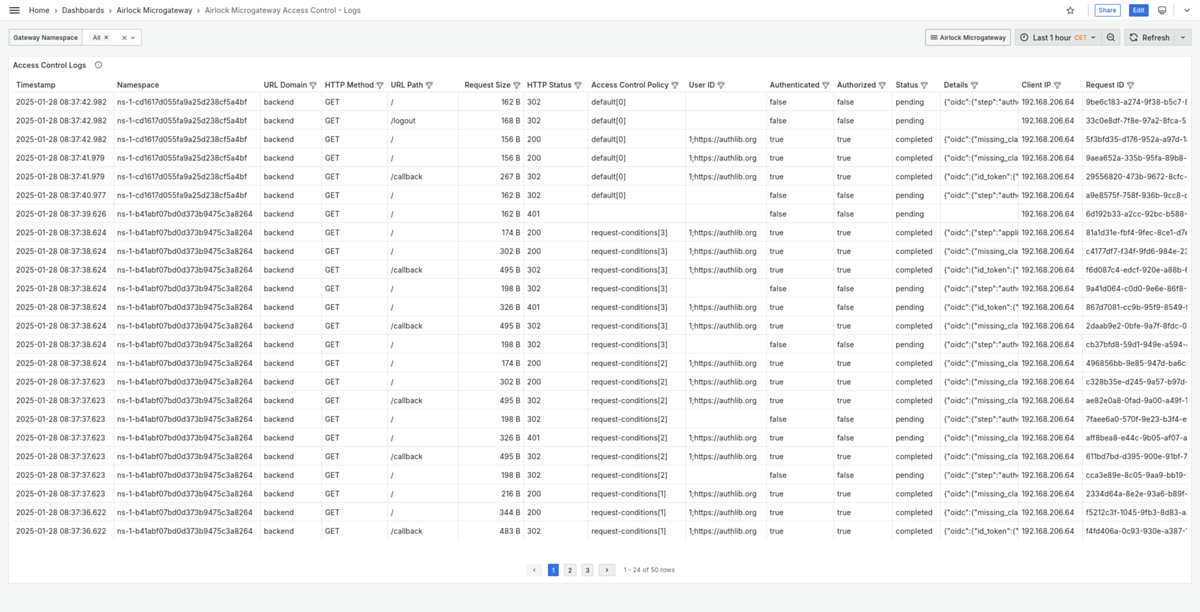
The built-in Grafana dashboard Airlock Microgateway Access Control - Logs shows log information for requests with access control details available.