Session Handling
Session handling lets Airlock Microgateway persist a state across requests by linking a session cookie to a server-side session entry in a session store (Redis or Valkey). This supports concrete filtering use cases such as troubleshooting (correlating request logs) and auditing (reconstructing what a user did within a specific session).
Session handling also lays the groundwork for advanced capabilities and authentication scenarios. It enables future features such as a cookie store and global rate limiting, and much more.
This article describes how to connect Airlock Microgateway to a session store.
Prerequisites
- A Gateway Deployment.
- A deployed and reachable Redis or Valkey instance.
See Requirements and limitations > Additional components for a list of supported Redis and Valkey versions for the session store.
Airlock Microgateway supports multiple Redis or Valkey deployment modes. Choose the one that matches your availability and scaling needs:
- Standalone (simplest)
A single Redis or Valkey instance that Microgateway connects to via one stable host/port. It is the simplest option and often sufficient for dev/test or smaller setups where high availability is not mandatory. The downside is limited resilience: if the instance is down or unreachable, session persistence is impacted until it recovers.
- Sentinel (high availability)
A master/replica setup monitored by Sentinel, which performs automatic failover and lets clients discover the current master. This improves availability without sharding, but adds operational components (Sentinel nodes and failover behavior) that must be maintained and monitored.
- Cluster with sharding (scaling and high availability)
A clustered deployment that shards data across nodes and typically uses replicas for availability. It scales capacity and throughput beyond a single node, but increases operational complexity (cluster topology, networking requirements, and scaling procedures).
- Cloud (managed Redis as a service)
A fully managed Redis or Valkey offering operated by a cloud provider or Redis Cloud. This can simplify operations and scaling, but requires network connectivity from Microgateway to an external service and typically calls for TLS (and optionally mTLS) to protect session data in transit.
Configuration
This section shows how to configure Airlock Microgateway with a session store.
Configure the Redis/Valkey password
Create a secret that contains the Redis/Valkey password under the key redis.password required by RedisProvider.
Configure the RedisProvider resource
Airlock Microgateway supports multiple Redis or Valkey deployment modes. Choose the one that matches your availability and scaling needs. Configure the RedisProvider which is referenced by SessionHandling and defines how Microgateway connects to Redis or Valkey.
Standalone:
Sentinel:
Cluster:
Configure the SessionHandling resource
SessionHandling configures session persistence, references RedisProvider, and governs session behavior.
The following session handling modes can be configured under spec.mode:
Enforce: All requests are aggregated into sessions. For requests without a session, a new session is created. For requests with an existing session, the session is reused and the idle time reset.OnDemand(default): Behaves like Enforce for routes which have access control with OIDC authentication configured. For all other routes, sessions will be neither created nor used.
Session sharing between different Microgateway deployments for SSO, is possible. It can be achieved by configuring the spec.cookie.attributes.domain, spec.prefix and spec.persistence setting to be the same across all corresponding SessionHandling CRs or using a shared SessionHandling CR.
Configure the GatewayParameters resource
Reference the CR SessionHandling in the CR GatewayParameters.
Configure the Gateway resource
Ensure your Gateway references the intended GatewayParameters custom resource via spec.infrastructure.parametersRef. The GatewayParameters custom resource must be deployed in the same namespace as the Gateway.
Configure mTLS to the session store (RECOMMENDED)
We highly recommend enabling SSL/TLS encrypted communication between the Airlock Microgateway and the Redis or Valkey database, to keep the session information secure. Note that both components, the Airlock Microgateway and the Redis database, must have the same TLS configuration for communication to be possible.
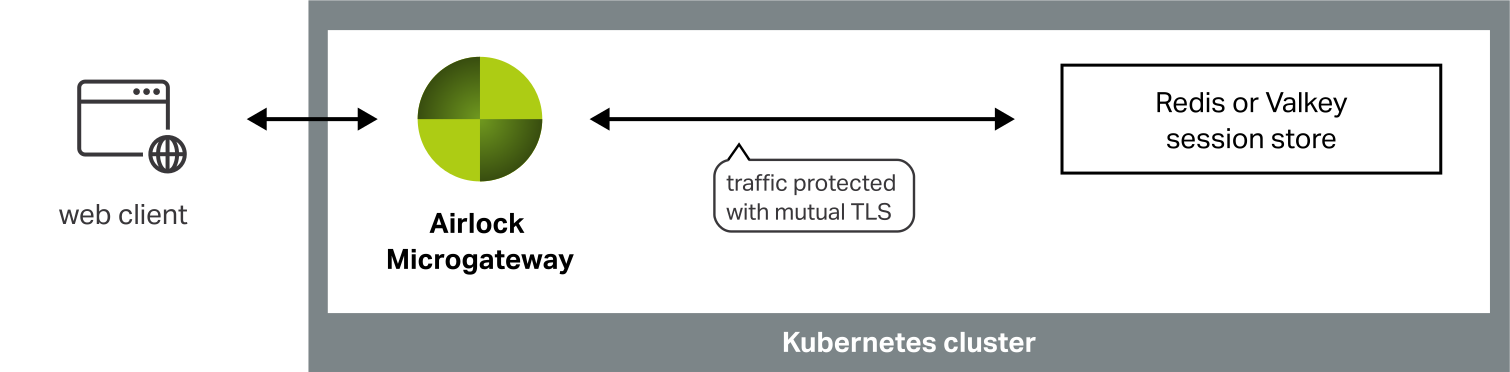
The following three building blocks are required to enable mTLS:
- Redis/Valkey configuration.
- Valid server certificate.
- Client certificate authentication is required.
- Microgateway trusts the CA that issued the server certificate.
- Microgateway presents a client certificate trusted by Redis/Valkey.
This manual describes only the Microgateway configuration because the Redis/Valkey configuration differs depending on the deployment form.
Updating the RedisProvider resource
Configure the spec.tls section in the previously created RedisProvider.
This configuration does two things:
- It configures the CA used to verify Redis’ server certificate.
- It configures Microgateway's client certificate.
Validation
Validate active session handling
With active session handling, the following will be observed when accessing a web application or API protected by Airlock Microgateway.
- The Airlock Microgateway session cookie is set in the browser.
The cookie name is configured in the CR SessionHandling underspec.cookie.name. - The Airlock Microgateway access logs show the field
airlock.http.session.idwith a value.