Realm administration
Realm administration partitions users into realms and grants administrators fine-grained, realm-scoped permissions through delegations. This administration model treats realm as a first-class attribute of each user and administrator and not as a context data item.
Authorizations are granted through realm roles. Each realm role is assigned one or more delegations. A delegation defines a set of permissions and the realm those permissions are valid for. This allows administrators to manage users across multiple realms, depending on the roles assigned to them.
IAM also supports the simple realm administration model, based on a realm context-data item assigned to both administrators and users. However, this is a legacy model. We recommend using the realm administration model described here whenever possible.
This chapter covers:
For a conceptual overview, see below.
Conceptual overview
Large IAM installations often need to split day-to-day user administration across many teams, business units, tenants or branches — without giving every helpdesk operator access to all users, and without creating a separate IAM instance per group. Realm administration addresses this by partitioning users into realms and allowing you to grant administrators precisely scoped rights for each realm. These rights are expressed as delegations.
The model is based on four core concepts:
- Realm: A named partition of users. For example: North, ACME Corp, Branch Zurich. Each user belongs to exactly one realm.
- Realm role: A role that can lead to permissions in one or more realms (via delegations). For example: Helpdesk user, user admin. Realm roles may be hierarchical: a role can have a parent role and/or subroles.
- Permission: A single, fine-grained action an administrator may perform, such as “Create user”, “Lock user” or “View token”. Some permissions are restricted by using parameters. For example: the permission
viewContextData{email,phone}restricts the visible user context data fields to Email and Phone. - Delegation: Ties the above three concepts together. A delegation specifies that the holders of realm role R in realm X have permissions P1…Pn. Within a realm, an administrator has all permissions granted by the delegations assigned to them. See also What is a delegation.
Management of users and administrators
In Realms mode, administrators are created as regular users and stored in the same database table as regular users (medusa_user). Administrator roles are granted via the Realm Management functionality in the Adminapp.
This is a major difference to role-based access control, where administrators are a separate kind of users, stored in the separate database table medusa_admin, and managed via the Administrators functionality in the Adminapp. The Administrators functionality is not available in Realms mode.
Delegations
Setting realm administration as the access control mechanism for the Adminapp will switch the IAM instance into Realms mode. In this mode, realm-specific permissions on users are driven by delegations. Global, non-user permissions on configuration, logs, technical clients, and so on, remain mapped to ordinary admin roles.
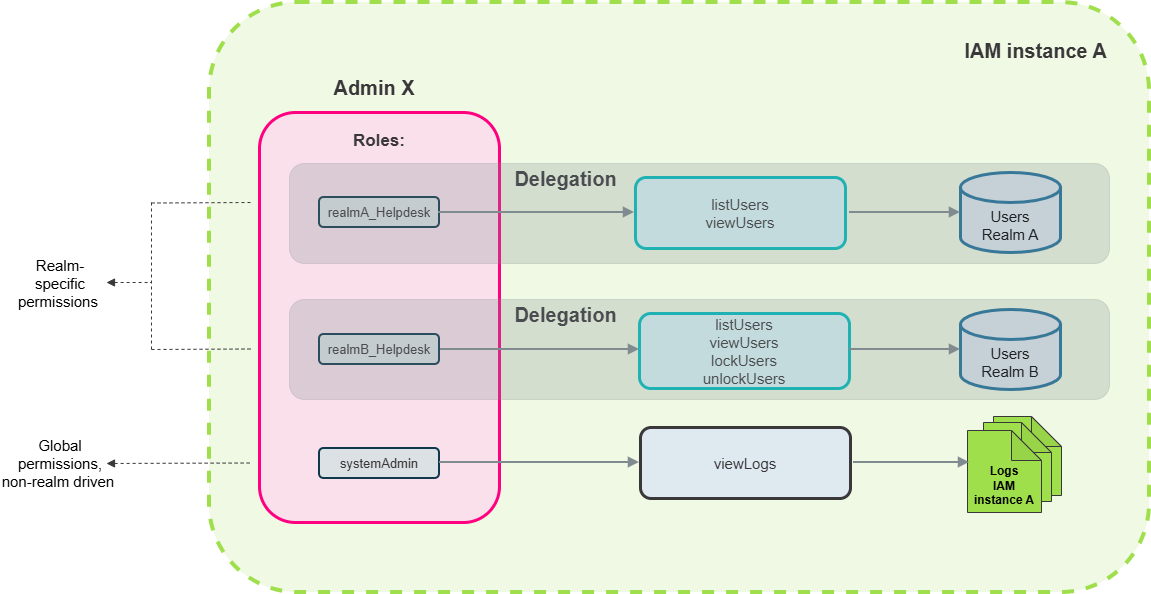
What is a delegation
A delegation authorizes the holders of a specific role R to use a defined set of permissions in a specific realm X.
A delegation connects:
- a realm role (i.e., every administrator holding that role),
- a set of permissions (defining what the administrators holding the particular realm role may do to users), and
- a realm (i.e., the partition of users to whom those permissions apply).
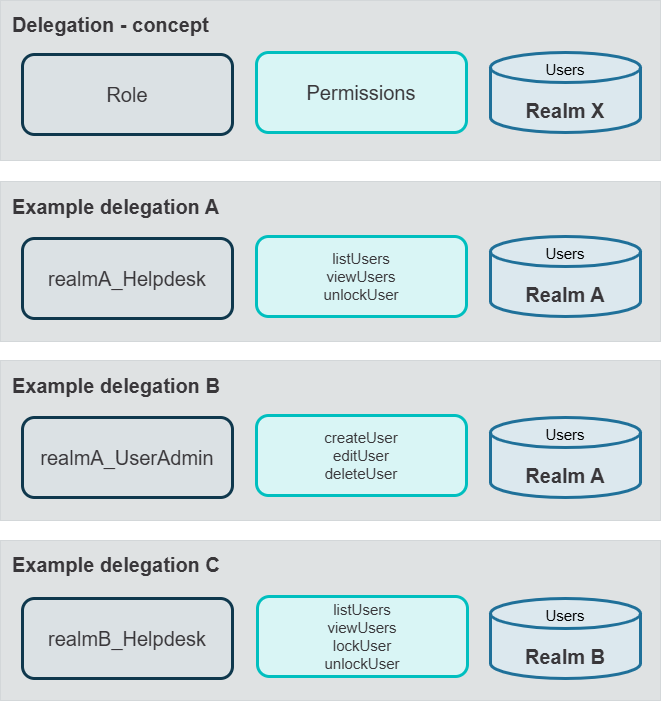
Delegations are additive and independent: An administrator may receive permissions through multiple delegations—for example, through one or more realm roles or across multiple realms. The administrator’s effective permissions are the union of all applicable delegations. A delegation can add permissions, but it never removes them.
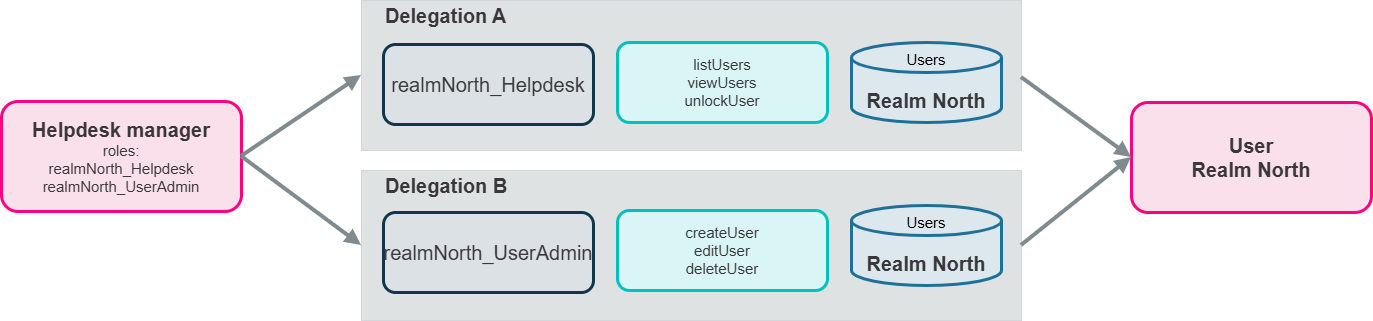
Example
Delegation A authorizes holders of the Helpdesk realm role to use the permissions “View user”, “List users”, and “Unlock user” on the North realm. As a result, administrators with the Helpdesk role can view, list, and unlock users who belong to the North realm.
Delegation B authorizes holders of the UserAdmin realm role to create, edit, and delete users belonging to the North realm. However, the UserAdmin role does not allow the role holders to unlock users.
Therefore, a helpdesk manager who needs to create, edit, delete, and unlock users belonging to the North realm must hold both the Helpdesk and UserAdmin realm roles. See also the figure below.
Use of roles in the Realms mode
The Realms mode includes several kinds of roles, see the table below. All roles share the following characteristics:
- All roles are defined in string format. Roles assigned to a specific user are stored comma-separated in the entry of this user in the
medusa_usertable. - Roles are assigned to or removed from users in the Adminapp, via Available roles <--> Active Roles fields.
- Roles are organized hierarchically; each role may have a parent role and/or one or more subroles.
Kind of role
Realm roles (hierarchical)
User roles (roles that can be assigned to users)
Roles used for the configuration of realm-based access control
Defined where
In the Adminapp (and stored in the
realm_rolesdatabase table)IAM configuration (Adminapp >> Users >> User Details Page - General section >> Available User Roles property)
IAM configuration (Adminapp >> Access Control)
Can be changed when
Can be created and edited at runtime
Needs a change of the configuration
Needs a change of the configuration
Use
In the Adminapp, in Realms mode only
In the Loginapp and target applications, to authorize users
In the Adminapp, in Realms mode only
Examples
branch-zurich_admin,helpdesk_northcustomer,employeerealms-managerRequired permissions to assign the roles
manageAdminRoles(realm-specific)editUser(realm-specific)editUser(realm-specific)Limitations when editing
Admins can only assign and unassign those realm roles to delegations and users that they hold themselves, or that are subroles of the realm roles they hold.
None
None
Only users with admin roles can access the Adminapp.
This applies to both global, non-realm-specific admin roles set in the IAM configuration and realm admin roles.
Direct roles and subroles
In the realm administration roles setup, there are direct roles and subroles.
- A direct role is a role that an administrator holds directly. It is stored in this user's entry in the
medusa_userdatabase table. - For user administration, an administrator must hold a role directly to obtain the permissions associated with the corresponding delegation. For example, to perform the “Edit user” permission in a specific realm, the administrator must hold a role directly, and this role must be associated with a delegation that includes the “Edit user” permission for this realm.
- Each direct role can have subroles or subroles of subroles. This hierarchy of roles is relevant for realm management.
- Realm management includes managing realm roles, delegations, and realms.
- Realm managers can only assign and unassign realm roles that they hold themselves, or that are subroles of the roles they hold.
- Realm managers can only create delegations for realm roles that they hold themselves, or that are subroles of the roles they hold.
- When creating a new delegation for a realm, a realm manager can only grant permissions they already “have” for that realm. IAM determines these permissions from all delegations for the realm that are assigned to the realm manager’s roles and subroles.
- Administrators with the “superadmin” role can create all roles, realms and delegations - they do not need a delegation for that. However, this does not automatically allow superadmins to edit all users. To do so, the superadmin still needs the required roles directly assigned to them. Currently, superadmins can assign these roles to themselves.
- Notice
The superadmin role is required for bootstrapping and resolving self-lockout situations. For routine administration tasks, the regular admin roles are sufficient.
Realm-specific permissions
Realm-specific permissions are granted through delegations. Each delegation defines which role has which permissions in which realm.
The table below lists realm-specific permissions per permission group (e.g., user, password, token).
Permission group | Permissions |
|---|---|
User |
|
Password |
|
Token |
|
OAuth 2.0 |
|
Roles |
|
* = Parameterized permissions
Parameterized permissions
Some permissions can include parameters:
- The permissions
viewContextDataandeditUsertake a comma-separated list of context-data field names. For example,viewContextData{email,phone}restricts visibility to the Email and Phone fields. - The permission
displayUserManagementExtensionstakes a comma-separated list of extension IDs. The wire format isid{p1,p2,…}. - An empty parameter list means “all fields” or “all extensions”, depending on the permission.
Overview of permissions per realm
To get an overview of the permissions available within a specific realm, use the following GET request:
GET /realm/realms/{realm}/available-permissions
The response includes all permissions you can put into a delegation for the respective realm.
Global permissions
Not all permissions are realm-specific. Some permissions are granted globally through administrator roles.
The table below lists all global permissions.
Management of | permissions | Remark |
|---|---|---|
Configuration |
| |
Logs (Adminapp Log Viewer) and license |
| Log access is not realm-filtered; a realm admin with this right sees log entries across all realms. |
Technical clients |
| |
Maintenance messages |
| |
Tokens |
| Token/license import distinct from the per-user token actions listed in Realm-specific permissions, which are delegated. |
Service Container access |
| |
Realm administration itself |
| Although these realm management permissions are global permissions, a realm administrator can only grant permissions they already have for that realm. These permissions are derived from the roles the administrator holds and their subroles. |
Use case
The following figure illustrates the realm administration concept. It displays the realms administration for company X consisting of the two locations North and South, with the following setup:
- Two realms, corresponding with the users in locations North and South
- One realms manager, who manages all realms, roles and delegations
- A helpdesk staff employee per location/realm
- A user manager per location/realm
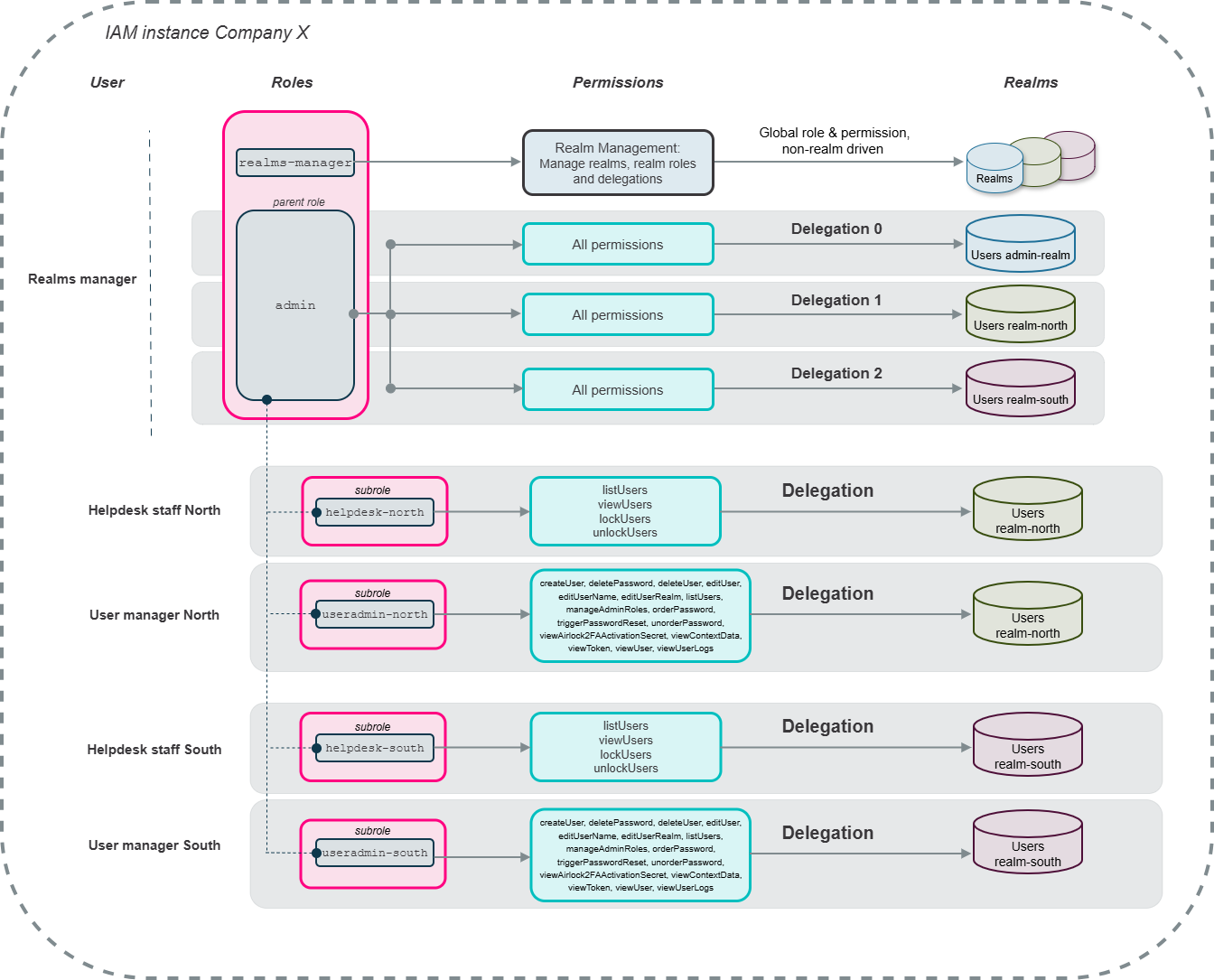
For a elaborated description of the use case, see Use case - Set up a realm administration