Adminapp REST API
Access Control
The Adminapp REST API is accessible only to authenticated admin users with the appropriate rights.
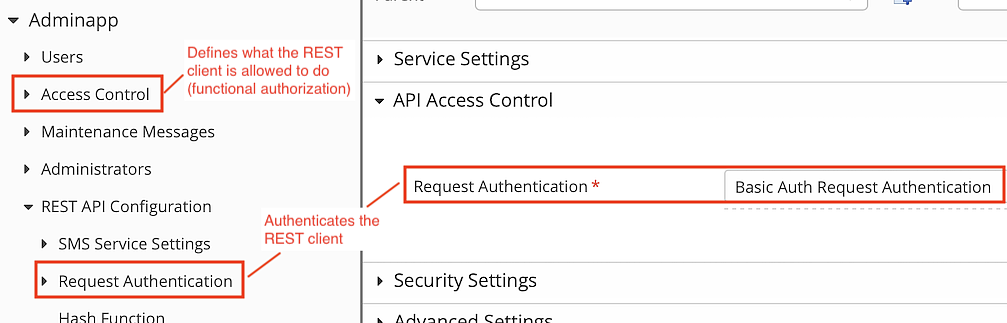
The configuration separates authentication of the REST client from functional authorization:
- Authentication: see Adminapp >> REST API Configuration >> Request Authentication
- Functional authorization: see Adminapp >> Access Control
Functional Access Control
The Adminapp >> Access Control property determines how authenticated REST clients are authorized to access the Adminapp REST API.
Two types of access control are available:
- Role-based access control (default): Access to the Adminapp is permitted based on predefined roles assigned to an administrator. These roles and their associated actions are configured in the Config Editor. The Role-based Access Control plugin implements this type of access control.
- Realm-based access control: Access to the Adminapp is based on realms, roles, and delegations. Users are partitioned into realms. Administrators are assigned precisely scoped rights within those realms through delegations. The Delegation-based Access Control plugin implements this type of access control.
Both controllers control access to a large set of actions. For more information, see
Service list
Supported services (see ADMIN-REST-API-REFERENCE for technical details) are:
Service | Description | Configuration path in Config Editor |
|---|---|---|
User Management | Comprehensive user management services (add, delete, modify, list, search, etc.). Get login statistics, lock/unlock user accounts, set validity range, etc. | Adminapp >> Users |
Password and Authentication Token Management | Management of users' authentication tokens: assign tokens to users, order new tokens, see token details, edit token details, order letters, etc. Define active authentication token for users, edit token migration details, etc. | mainly in Adminapp >> Users >> Authentication Tokens (Credentials) also various properties in Adminapp >> Users |
Generic Token API | Custom REST services for custom authentication tokens or other user-related custom information can be added by configuring a “Generic Token Controller” plugin. | Adminapp >> Users > Authentication Tokens (Credentials): add a Generic Token Controller |
Token Management | Management of tokens independently of users (e.g. manage hardware OTP tokens, view Cronto token licenses). | Adminapp >> Tokens |
Technical Client Management | Manage technical clients (API clients). | Adminapp >> Technical Clients |
Maintenance Messages | Manage maintenance messages (list, add, delete, modify). | Adminapp >> Maintenance Messages |
SMS Service | Send an SMS message and get the delivery status. | Adminapp >> REST API Configuration >> SMS Service Settings |
Tech Client Management | List, Lock/Unlock, and Delete technical clients (API clients). Related to PSD2 features (see STET PSD2 with Airlock components, NextGenPSD2 (Berlin Group) with Airlock Secure Access Hub) | Adminapp >> Technical Clients |
Realm Management | Management of realms, roles, and delegations This service is available only when realm-based access control is enabled for the Adminapp. | Adminapp >> Access Control >> Realm Management |
Attribute level access control (input validation)
To access user attributes through the Adminapp REST API interface, every attribute must be configured as a User Profile Item. This ensures that both GUI and REST API enforce the same access restrictions. To configure User Profile Items see Role-based access control in the Adminapp.