Post-quantum Cryptography
TLS integration
With the advent of quantum computers capable of breaking classical public-key cryptographic schemes, widely used algorithms (including RSA and elliptic-curve cryptography) will become insecure. This already poses a serious risk to long-term confidentiality. In harvest-now-decrypt-later attacks, encrypted traffic is recorded today and stored so it can be decrypted later when sufficiently capable quantum computers become available.
Post-quantum cryptography (PQC) mitigates this threat by introducing algorithms designed to withstand both classical and quantum attacks. Airlock Microgateway integrates PQC in the TLS handshake using hybrid key exchange groups (classical and PQC combined). This maintains compatibility because clients that do not support PQC can negotiate traditional groups (e.g, X25519). Some performance overhead may be observed due to the additional computational cost of post-quantum algorithms.
In Airlock Microgateway, PQC is enabled by default for TLS connections and can be disabled. This article applies when Microgateway is intended to terminate client-facing TLS traffic or when Microgateway initiates upstream TLS connections to backend services.
PQC in hybrid key exchange groups
PQC algorithms are not used as standalone cipher suites. They are part of TLS key exchange groups (also known as ECDHE groups). In hybrid mode, the post-quantum algorithm is combined with a classical key exchange. The only hybrid group used in Airlock Microgateway is X25519MLKEM768, which combines classical X25519 key exchange with the post-quantum MLKEM768 algorithm.
In this article, TLS supported groups refers to the key exchange groups negotiated during the TLS handshake; the configuration key microgateway.airlock.com/ecdhCurves defines the allowed TLS supported groups in order of preference.
PQC-based authentication is currently not applicable to public key certificates because relevant standards for post-quantum public key infrastructure are still in development. Therefore, post-quantum public key certificates are neither standardized nor supported by browsers, yet. This makes broad deployment of such certificates currently impossible.
- From an IT security perspective, however, this delay is not considered problematic: an attacker would already need access to a highly capable quantum computer today to successfully forge or break authentication mechanisms — a scenario that is currently regarded as highly unlikely. Unlike the confidentiality risks associated with harvest-now-decrypt-later attacks, the risk to authentication remains negligible at the current stage.
Prerequisite
Post-quantum cryptography requires TLS 1.3. Ensure that TLS 1.3 is enabled in Airlock Microgateway and that it is supported by the connecting client (downstream) and the backend service (upstream).
TLS connections have TLS 1.3 enabled by default.
Configuration
PQC for downstream
This section applies when Airlock Microgateway terminates the downstream TLS connection. PQC is enabled by default for downstream TLS connections and is negotiated automatically when the client supports it. If required, you can disable PQC for a listener by excluding the PQC-enabled key exchange group from the TLS supported group list.
Disable PQC for downstream TLS connections
There is no separate option to toggle PQC algorithms independently. Therefore, the only option to disable PQC support is to define a custom TLS supported group list excluding the hybrid X25519MLKEM768 TLS group for post-quantum key exchange. This can be achieved by using the microgateway.airlock.com/ecdhCurves setting in the CR Gateway.
Edit the CR Gateway and configure the TLS supported groups (ecdhCurves).
PQC for upstream
This section applies when Airlock Microgateway initiates the upstream TLS connection. PQC is enabled by default for upstream TLS connections. If required, you can disable PQC for upstream connections.
Disable PQC for upstream TLS connections
There is no separate option to toggle PQC algorithms independently. Therefore, the only option to disable PQC support is to define a custom TLS supported group list excluding the hybrid X25519MLKEM768 TLS group for post-quantum key exchange. This can be achieved by using the microgateway.airlock.com/ecdhCurves setting in the CR BackendTLSPolicy.
Edit the CR BackendTLSPolicy, configure the TLS supported groups (ecdhCurves).
Validation
Validate PQC usage in Grafana
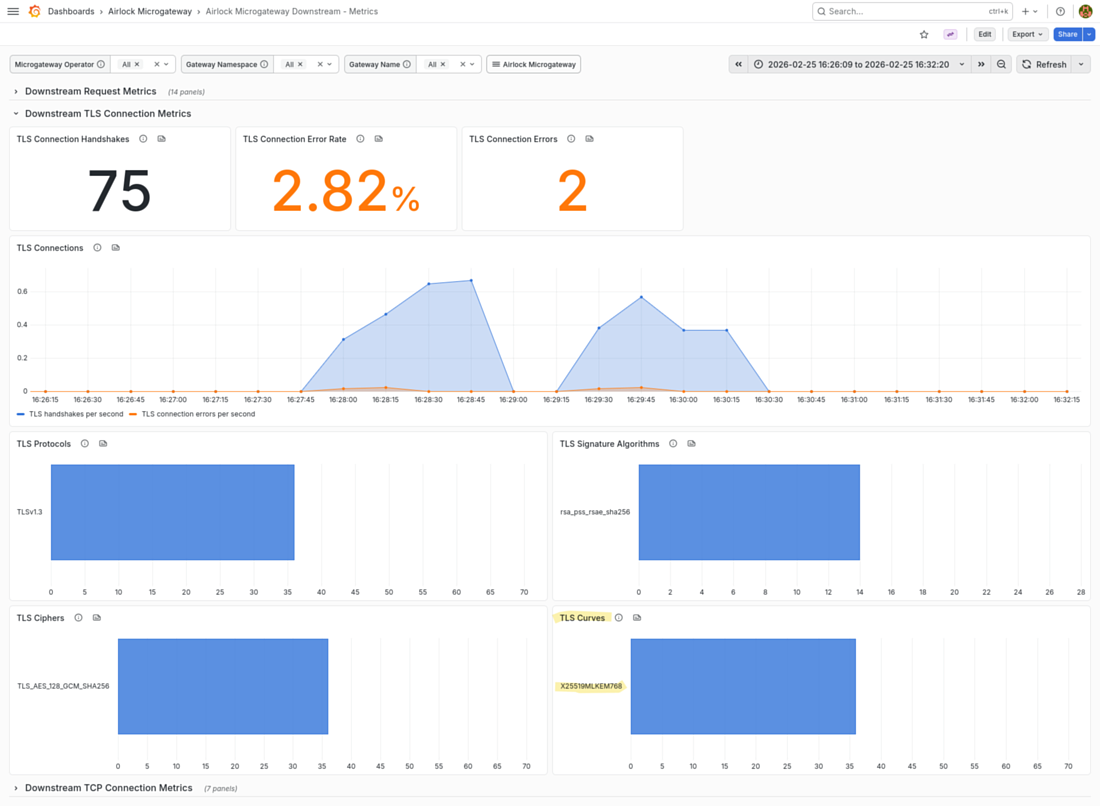
The built-in Grafana dashboard Airlock Microgateway Downstream - Metrics shows the TLS supported groups used in successful TLS connections. The same metric is available for upstream connections in the Airlock Microgateway Upstream - Metrics dashboard.
Validate PQC usage in a browser
With PQC enabled, the following will be observed in the browser's developer console when accessing a web application or API protected by Airlock Microgateway.
Google Chrome
- Open the website you intent to inspect.
- Press F12 or right-click and choose Inspect to open the Developer Tools.
- Go to the Security tab.
- Under Connection, check in the Key Exchange or Key Agreement field if PQC is used (i.e.
X25519MLKEM768) - The hybrid PQC group may be listed as follows:
- Example
X25519MLKEM768
Mozilla Firefox
- Open the website you intent to inspect.
- Press F12 or right-click and choose Inspect to open the Developer Tools.
- Go to the Network tab.
- Reload the page and click the main document request (usually the first one).
- In the Security subtab (on the right), look for Key Exchange Group or Key Exchange.
- The hybrid PQC group may be listed as follows:
- Example
mlkem768x25519
Naming may vary (e.g., X25519MLKEM768Draft00, X25519+MLKEM768, or similar), depending on the browser version.
Limitations
The following limitations apply to the current PQC implementation:
- Upstream connections do not use TLS 1.3 by default. As a result, PQC is disabled by default for upstream connections.
- TLS supported group metrics are available only for downstream TLS connections.
- Access logs do not indicate which TLS supported groups were negotiated or used.