Section – Event Notification Channels
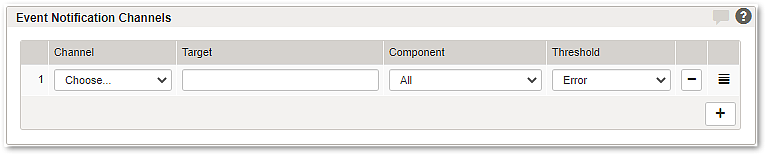
Multiple event notification channels can be configured. Each notification target consists of a channel and its corresponding destination: an email recipient for email notifications or a URL for HTTP requests. In each row, select the channel, enter the target recipient or URL, and choose the event threshold for the events to be sent to that destination.

Messages are not queued. If a notification channel cannot be reached, the message is discarded.

GUI

Description

Channel

Available event notification channels are:

  • Mail
    Events will be sent to the specified mail recipient. For mail events it is recommended to define meaningful mail aliases to distribute the event messages to the responsible persons.
    The SMTP host has to be configured here: Section – SMTP Settings.
  • HTTP
    Events will be sent to the specified URL. This could be used to connect to external alerting systems such as SMS-gateways, pagers, or centralized log management and monitoring systems.
    The following placeholder can be used:
     
  •  
    Example

    @@ALRT_ID@@ : Alert ID
    in example message : EVENT_SY-Y-TTY-LOGIN-OK
    @@ALRT_COMP@@ : Component, which triggered the alert
    in example message : SY
    @@ALRT_TIME@@ : Time when the alert was triggered.
    in example message : Mar 13 15:17:21.394786
    @@ALRT_TXT@@: Alert body (message).
    in example message : login[80890]: [event.notice] successful console login (ROOT)

    Example message : Mar 13 15:17:21.394786 airlock.example.com airlock-alert[81330]: m:EVENT_SY-Y-TTY-LOGIN-OK c:Y Successful console login (ROOT)

    http channel example: "http://mysmsgate.com/cgi-bin/sendsms.pl?msg=@@ALRT_TXT@@&phone=12345"

Target

Specifies where matching event notifications are sent for the selected channel. For Mail, enter the mail recipient, such as an email address or mail alias. For HTTP, enter the destination URL to be requested; the URL may include alert placeholders such as @@ALRT_ID@@, @@ALRT_COMP@@, @@ALRT_TIME@@, and @@ALRT_TXT@@.

Component

This parameter specifies whether all events or just selected events concerning “System” or “Web-Requests” are sent over the specified channel.

Threshold

Available event notification thresholds are:

  • Error
    • Contains important error messages from incidents which may have direct impact to the system operation and should be inspected immediately.
      Example: Failed disk(s) detected.
  • Warning
    • Contains messages of the levels warning and error. The cause of these messages should be inspected.
      Example: SSL certificate will soon expire.
  • Notice
    • Contains messages of the levels notice, warning and error with important information about the status and operating mode of Airlock Gateway.
      Example: New Configuration activated.
  • Info
    • Contains messages of the levels info, notice, warning and error with useful information about the status and operating mode of Airlock Gateway.
      Example: Back-end host changed state to BAD.

Further information

See the “Event Description” page to find all events related to a specific level.