SaaS roles and permissions
In Airlock SaaS, users that interact with the Airlock SaaS Management Center (AMC) are called actors. Actors hold certain roles with corresponding permissions. These permissions allow performing the tasks associated with the role. By assigning a role to a user, the corresponding permissions are granted.
For an overview of the SaaS actors, see below. For a detailed overview of available roles and permissions, see .
Administrator | In Airlock SaaS, the administrator is responsible for managing and operating the Airlock SaaS service. An administrator with the role SaaS Administrator has full access to the organization, including all its tenants and its administrators. This role also allows managing generic secrets and key pairs used in the IAM configurations. Additionally, the SaaS Administrator can view and manage OAuth 2.0 clients used for system to system communication via Airlock APIs. A special SaaS administrator is the first SaaS administrator. This is the person who creates the Airlock SaaS account by performing a self-registration flow. Upon successfully completing the self-registration flow, this first SaaS administrator can access the Airlock SaaS Management Center (see also First steps with Airlock SaaS). The first SaaS administrator holds per default all available roles, including the SaaS Administrator role. They can set up the SaaS organization that represents the SaaS customer as well as all required tenants. They may also invite other administrators and assign the invited administrators to tenants. Invited administrators can by default only perform tasks on end-users, such as search for and manage end-users, view end-user logs, -profiles and authentication tokens. It is possible to assign additional roles to the invited administrator, such as the SaaS Administrator role or individual roles, depending on their task. For a detailed overview or roles, permissions, and related actors, see . |
End-user | End-users are the persons that access your company's applications. They do this via the tenant Loginapp, according to the authentication and authorizations flows defined in the corresponding active tenant IAM configuration. Notice The roles shown in do not apply to end-users. End-users have their own roles, which are configured as part of the tenant configuration. For more information, see Working with end-users. |
Airlock SEC | The Airlock SEC actor is responsible for creating/altering a tenant IAM configuration according to the requirements of your company, and uploading these new/altered IAM configurations into the Airlock SaaS Management Center. Currently, only employees of Airlock or Airlock partners can hold this role. |
The diagram below graphically illustrates the SaaS concept of actors, roles and permissions.
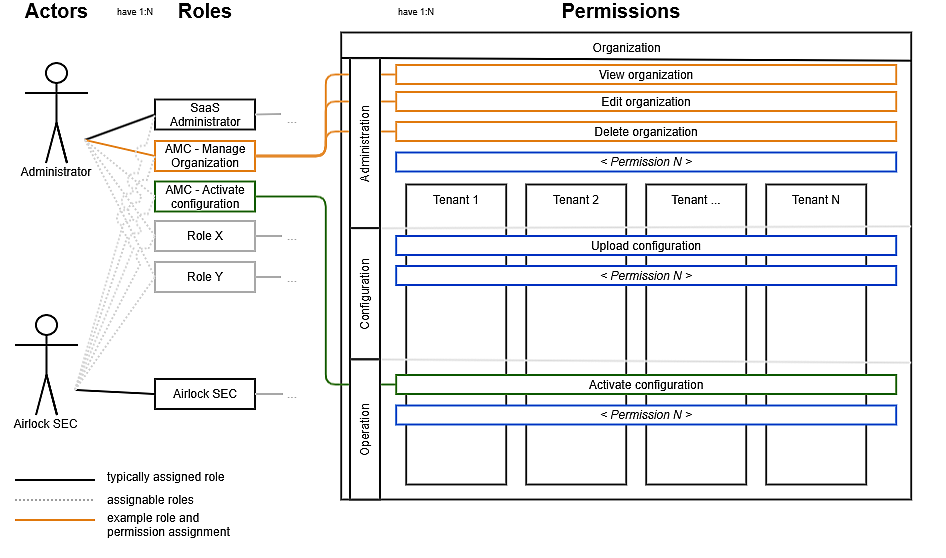
SaaS roles and permissions
The tables below lists the available SaaS roles and associated permissions. Most roles and permissions apply to the administrator actor.
The first table shows the roles and permissions relevant for working with the Airlock SaaS Management Center, such as creating a tenant, inviting administrators or activating an IAM configuration. The second table lists roles and permissions only applicable to the tenant IAM Adminapp, where administrators manage the end-users of your application(s).
Permissions relevant to working with Airlock Saas
The following table shows the roles and permissions relevant for working with the Airlock SaaS Management Center, such as creating a tenant, inviting administrators or activating an IAM configuration.
Role | Associated permissions | Granted by default to | |
|---|---|---|---|
First administrator | Invited administrator | ||
Airlock SEC1) This role can currently only be removed, not assigned. Contact Airlock SaaS Support if you accidentally removed this role from an Airlock SaaS user. |
Airlock SEC actors have access to all tenants within their organization. | n/a | n/a |
AMC - Manage administrators1) Risk Users with this role can grant themselves the “SaaS Administrator” role, thereby gaining full control over all tenants, administrators and their respective roles. |
| 2) | |
AMC - Activate configuration | Activate configuration | 2) | |
AMC - Manage vault |
| 2) | |
AMC - Manage organization |
| 2) | |
AMC - Manage tenants |
| 2) | |
AMC - Manage TLS configuration |
| 2) | |
AMC - Manage users | Manage users | 2) | ✓ |
AMC - View vault | Read vault entries Functional limitation The value of secrets and key pairs is not visible. | 2) | |
SaaS Administrator1) If this role is accidently removed from all SaaS administrators, access to the corresponding organization is no longer possible. Contact SaaS Support to regain access to the organization- and tenant settings. | Within the AMC:
The SaaS Administrator has access to all tenants within his organization. | ✓ | |
- n/a
Not applicable
- 1)
This role gives significant power to the holder, for the reasons mentioned in the table. Therefore, exercise caution when assigning the role.
- 2)
Implicitly through the SaaS Administrator role
- 3)
Currently not possible. Contact SaaS Support if you need to delete an OAuth 2.0 client.
Permissions relevant to working with the tenant Adminapp
The table below lists roles and permissions only applicable to the tenant IAM Adminapp, where administrators manage the end-users of your application(s).
Role | Associated permissions | Granted by default to | |
|---|---|---|---|
First administrator | Invited administrator | ||
Activate Authentication Token | 1) | ✓ | |
Add New User | 1) | ✓ | |
Deactivate Authentication Token | 1) | ✓ | |
Delete Authentication Token | 1) | ✓ | |
Delete Maintenance Messages | 1) | ✓ | |
Delete User | 1) | ✓ | |
Delete User Password | 1) | ||
Edit Authentication Token | 1) | ✓ | |
Edit Maintenance Messages | 1) | ✓ | |
Edit User Profile | 1) | ✓ | |
Edit Username | 1) | ✓ | |
Generate Or Set User Password | 1) | ✓ | |
Import Tokens | 1) | ✓ | |
List Maintenance Messages | 1) | ✓ | ✓ |
Lock User | 1) | ✓ | |
Search Users | 1) | ✓ | ✓ |
Trigger Password Reset | 1) | ✓ | |
Unlock User | 1) | ✓ | |
View Airlock 2FA Activation Secret | 1) | ||
View Authentication Token | 1) | ✓ | ✓ |
View User | 1) | ✓ | ✓ |
View User Logs | 1) | ✓ | ✓ |
View User Profile | 1) | ✓ | ✓ |
- 1)
Same name as corresponding role