Airlock Gateway network setup
This article explains how to integrate Airlock Gateway into your network. It focuses on common pitfalls and compares the security and operational trade‑offs of several network setups, so you can select an approach that fits your environment. Airlock Gateway supports multiple network setups and can be introduced with minimal disruption to existing topologies. You can run a single‑homed (one network interface controller, or NIC), dual‑homed (two NICs), or triple‑homed (three NICs) setup.
- A single‑homed setup can operate with one IP address.
- Dual‑ and triple‑homed setups typically use multiple IPs (often on separate subnets).
If a shared IP is unavoidable (typically in single-homed setups), we recommend configuring virtual hosts to run on ports 80/443 and configuring the management interface to run on port 8443. The management port can be set during installation or adjusted later in the Configuration Center.
Note: Do not bind virtual hosts to alternate internal ports such as 8080/8443. This workaround is not recommended and may pose a security risk.
From the perspective of Airlock Gateway, the network is commonly divided into three areas:
- External (client‑facing)
- Back‑end (application services)
- Management (administration)
Client traffic is received on the external (client-facing) network area. Services such as virtual hosts and TLS termination run in the front end, which is logically bound to this external interface. In advance, client addresses on the internet are unknown. Therefore, ensure that the default route for client traffic leads out through the external segment so return traffic reaches those clients reliably. In more complex internal network topologies, however, this setup can be difficult to implement. In such cases, consider using source-based routing as an alternative to the default-route model (see below).
Although Airlock Gateway provides interface-level filtering and application-layer security, it is not intended to replace a dedicated network firewall at the Internet perimeter. Without such perimeter protection, Airlock Gateway is directly exposed to raw Internet traffic. This increases the attack surface, makes the system more vulnerable to DoS/DDoS attacks, port scans, and other low-level threats, and leaves only interface-level filtering as a safeguard.
- Place a dedicated network firewall or managed perimeter control in front of the external interface to ensure layered defense as well as offload low-level packet filtering, and to improve performance under load.
Top-level network overview
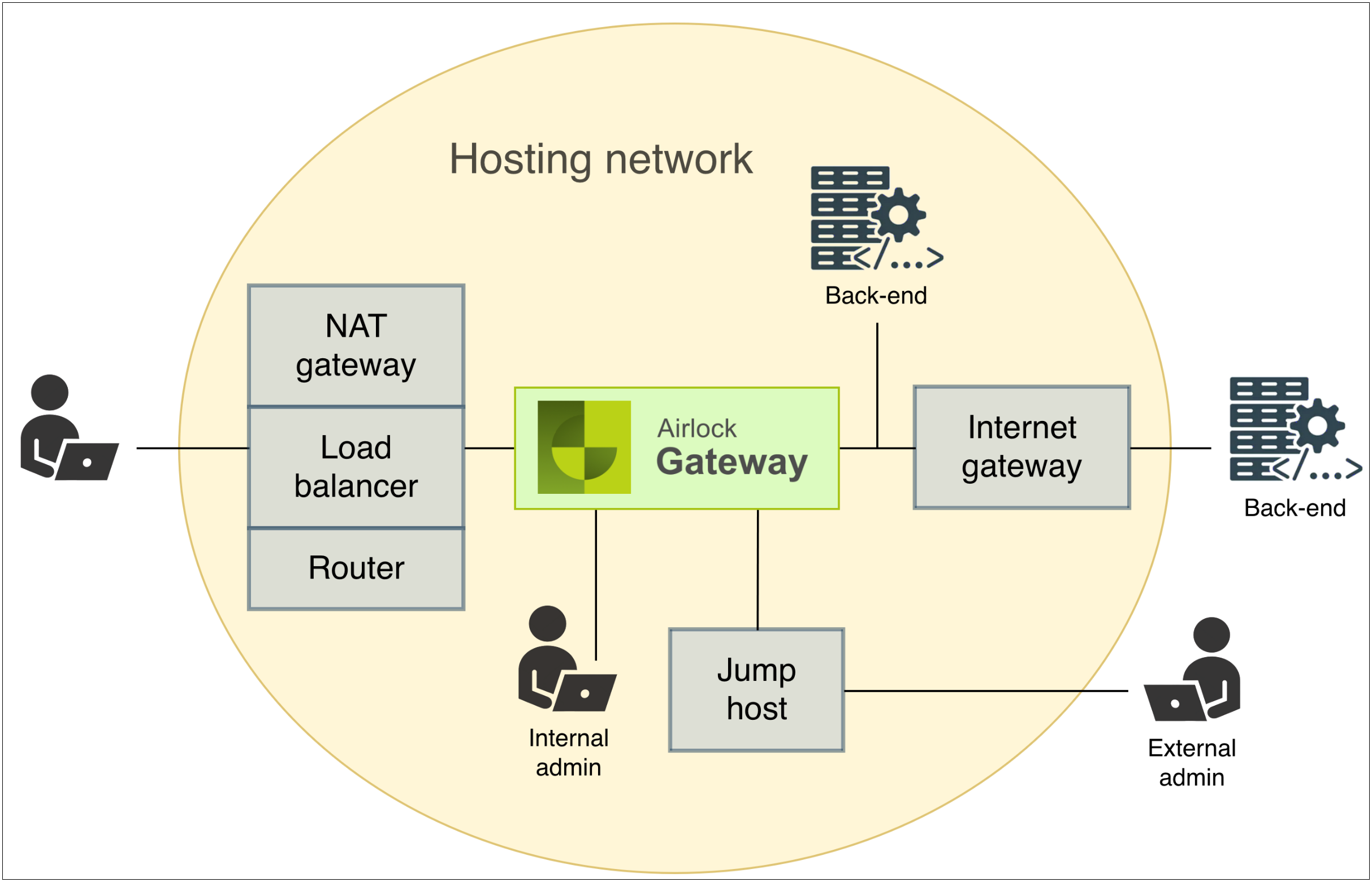
The following diagram provides an overall view of Airlock Gateway within the hosting network. Positioned between untrusted client traffic and protected application systems, Airlock Gateway secures all inbound and outbound communication and shields the backend from direct exposure.
Client requests from the external network are terminated and processed at the front end, where Airlock Gateway applies application-layer protection and request filtering. Filtered and validated requests are then forwarded to the backend in the protected internal network. Administrative access is typically initiated from trusted internal segments or routed through a controlled jump host. Airlock Gateway defines three logical network areas which may correspond to physical or virtual network interfaces depending on the hosting infrastructure:
- External (client-facing) network
- Represents the untrusted zone, typically the Internet or a DMZ receiving inbound client connections.
- Clients send HTTPS requests to virtual hosts running on the front end of Airlock Gateway.
- Requests may first pass through optional infrastructure components such as a router, load balancer, or NAT gateway, which handle routing, traffic distribution, or address translation before reaching Airlock Gateway.
- Airlock Gateway
- Acts as a reverse-proxy, terminating client sessions at the front end and forwarding inspected, authenticated requests to the protected backend.
- Provides application-layer security, including request filtering, authentication, and session management.
- Offers a dedicated management interface (Configuration Center and SSH) for administrative access. Internal administrators typically access the system directly, while external administrators connect via a jump host for controlled management access.
- Back-end (application) network
- Hosts the internal application servers and services protected by Airlock Gateway.
- Responses from these systems are routed back through Airlock Gateway, which relays them to the clients via the front end. If present, an internet gateway handles external network routing.
- Access to the backend should be tightly restricted, and the backend must never be exposed directly to the external network.
Common design principles for all network setups
Before choosing a single‑, dual‑, or triple‑homed network setup, we recommend applying the following design principles. They reflect field‑tested practices for publishing services through a load balancer, providing controlled egress via network address translation (NAT), and restricting administration to a jump/bastion path. Adopting these early—while you finalize subnets, routing, and access controls—reduces misrouting, limits management exposure, and keeps operations predictable across on‑premises and public‑cloud environments.
- Load balancer in front of Airlock
Use a network or application load balancer to publish service IPs and distribute traffic to one or more Airlock nodes. This component is typically the public entry point and forwards traffic to Airlock Gateway.
- Controlled egress path to the internet
Note: If your environment does not require Airlock Gateway to access external services or update channels, no special egress configuration is needed.
Where internet access is required, depending on your network topology, either NAT or source-based routing may be the preferred option:
- If back-end services or update channels are reachable only on the internet, place a NAT device or service on the external side so Airlock Gateway can access them without assigning public IP addresses to all nodes. The required sizing and limits depend on the platform or device you use.
- Instead of NAT, you can configure source-based routing. In this setup, back-end traffic is routed back to the Internet via the default gateway. Source-based routing requires more effort to configure but eliminates the need for NAT. For details, see the configuration instructions for enabling and using source-based routing in Airlock Gateway.
- Jump/Bastion host for administration
Provide a jump host in a controlled segment to reach the management interface (SSH / Configuration Center) without exposing management ports publicly.
- Management‑plane isolation
We recommend binding management services to a dedicated interface/IP/subnet wherever possible.