Tab – DNS Provider Selection
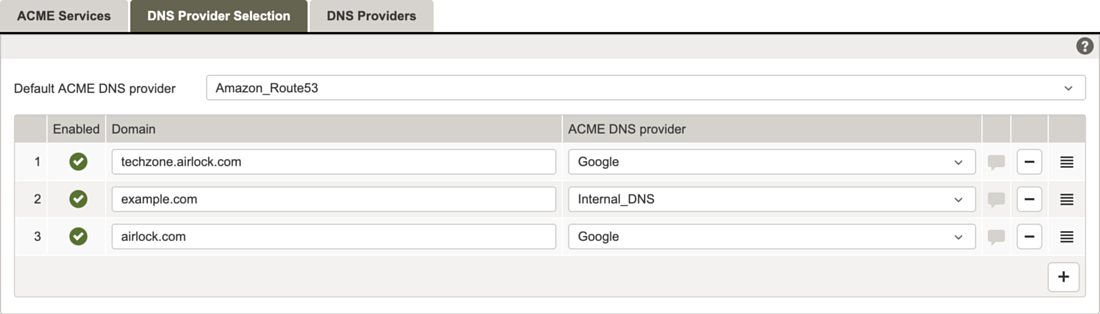
This tab allows you to define domain-to-DNS-provider mappings for ACME-based certificate issuance. These domain-specific mappings determine which DNS provider is used to answer DNS-01 challenges for a given domain during ACME certificate validation. To add a new mapping, click the + button.
GUI | Description |
|---|---|
Default ACME DNS Provider | Drop-down menu with the available DNS providers (as configured in the DNS Providers tab). The selected DNS provider serves as the fallback for ACME DNS challenges when no specific provider is assigned to a domain. |
Enabled | By default, a mapping is enabled. It can be disabled using the button. |
Domain | Input field where the domain name must be entered. |
ACME DNS provider | Drop-down menu with the available DNS providers (as configured in the DNS Providers tab). |

The domain mappings are processed from top to bottom. The first entry whose domain name exactly matches or ends with the requested domain is applied. If a broader domain (e.g., airlock.com) appears earlier in the list, it will be applied instead of a more specific domain (e.g., techzone.airlock.com).
- To ensure that a mapping with a more specific domain is applied, place it above mappings with broader domains in the list.