Internationalization (i18n) with language and country codes
Language codes (only)
2-letter language codes from the ISO 639-1:2002 standard can cover most of the world's major languages and are used for all supplied UI-related and non-UI-related texts in Airlock IAM.
Adding/customizing languages:
- Airlock IAM comes preconfigured with major European languages. The text strings are stored in UTF-8 encoded properties files for each language, e.g.
en.properties(Loginapp UI) or in differentstrings_en.propertiesfor other IAM components. - Changes to the Loginapp UI can be made using the Loginapp Design Kit.
- New languages or translations can be configured by adding and translating new properties files for the corresponding IAM components.
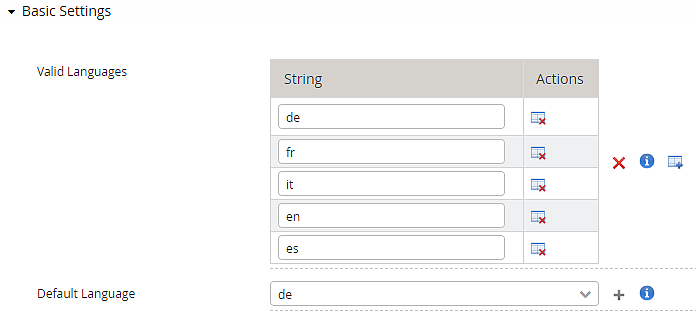
- After adding a new properties language file, the corresponding 2-letter language code must also be added in the Config Editor under Language Settings for the Loginapp, Adminapp and Transaction Approval to make the language selectable by the user.
Example:
Language-country code combinations
Airlock IAM partly supports the use of 5-character language-country code combinations (also called localized language codes).
The combined codes consist of the lowercase, two-letter language code according to ISO 639-1:2002, followed by an underscore (_) and the uppercase, two-letter country code according to ISO 3166-1. For example, es_VE represents Venezuelan Spanish. This corresponds to an Accept-Language HTTP request header containing es-ve.
The support applies to:
- Loginapp UI texts that are configured using the Loginapp Design Kit and in
*.propertiesfiles, e.g.,es_VE.propertiesfor Venezuelan Spanish. - Loginapp REST API/Transaction Approval texts in
strings_*.propertiesfiles, e.g.,strings_es_VE.properties.
The localized language codes work correctly with the browser’s speech recognition.
Combinations of language and country cannot be used for the Adminapp UI and Service Container module.
If the language information is invalid, for example because of an invalid language code or an unsupported language-country combination, the default language is used as fallback.
Localized translations for Loginapp UI and Transaction Approval require to be referenced in the language settings of the Config Editor:
- After adding a new UTF-8 encoded
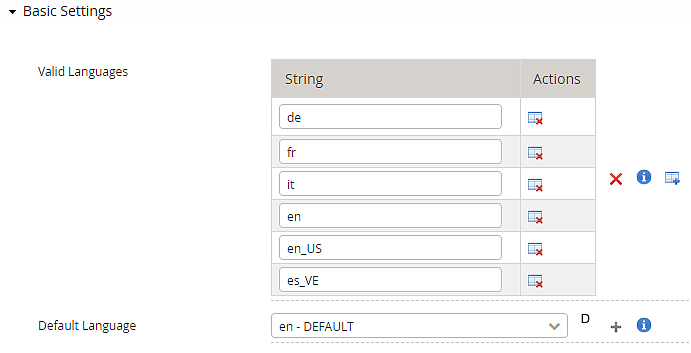
propertieslanguage file, the corresponding 5-letter language-country code must also be added in the Config Editor under Language Settings, to make the localized language available for the user. Example:
Further information and links
Internal links:
External links: