Traffic Matchers detail page
Traffic Matchers are configured as sets of regex filters and IP Lists that can be applied to incoming traffic.
- Training Data Collection to exclude selected traffic from being collected as training data
- Anomaly Detection Exclusions to exclude selected traffic from Anomaly Shield analysis, e.g., internal vulnerability scans or monitoring traffic. Excluding such traffic can also reduce system load.
- Response Rule Exceptions to prevent Anomaly Shield response actions for selected traffic, e.g., to allow a vulnerability scan without disabling Anomaly Shield for other traffic
Section – Traffic Matcher

- Name – assign a unique name for the entry.
- Tenant – add tenants to allow tenancy access. See also Multitenancy feature.
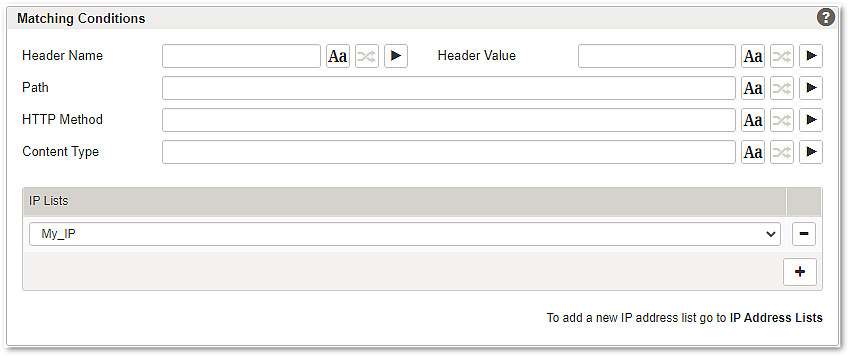
Section – Matching Conditions
Notice
Incoming traffic must meet all conditions to match the Traffic Matcher, empty conditions are ignored. If an IP list is configured in the matcher, at least one IP list entry must match along with all other configured conditions in order to generate a traffic match.
Available conditions:
- Header Name – a regex to match certain header names. Example syntax:
^X-Header$ - Header Value – a regex to match certain header values. Example syntax:
^X-Value$ - Path – a regex to match certain paths. Example syntax:
^/path/to/match - HTTP Method –a regex to match certain HTTP methods. Example syntax:
^(GET|POST)$ - Content Type – a regex to match a certain type of content. Example syntax:
^application/.* - IP Lists – Use the + button to select one or more IP addresses that should be matched.
Further information and links
- Tab – Traffic Matcher as the entry point to this detail page.
- Traffic Matchers are referenced on the Application detail page.